


Build to Thrive is for professional operators building asymmetric advantage in the AI age. I focus on pattern intelligence, understanding where leverage is shifting, share practical systems you can build this week to capture that shift and translate insight into bottom line results. Free subscribers get sharp strategic breakdowns and actionable operating systems. Paid members unlock the full Vault of tools, premium prompts, and advanced frameworks designed to turn disruption into durable leverage.
Editorial Note
The Last Two Weeks Felt Different
Over the last two weeks, something subtle shifted.
Anthropic introduced Claude Cowork, an AI agent with desktop-level autonomy. It can access files, generate documents, and execute multi-step workflows on its own.
OpenClaw began coordinating email, calendars, and browser actions autonomously.
Clawork and Rent-a-Human pushed the idea further, positioning AI agents not as tools but as digital coworkers embedded inside real operations.
Then Matt Shumer wrote, “Something big is happening,” capturing what many builders were already sensing. Models are no longer just assisting. They are completing complex work independently.
Around the same time, Microsoft’s head of AI stated publicly that AI is approaching the ability to automate most professional tasks far sooner than many expected.
Individually, none of these moments feels apocalyptic.
Together, they signal something structural.
The cost of knowledge, execution, and coordination is collapsing at the same time.
For decades, professionals and business operators created value inside those layers. We were the ones who knew, who executed, who coordinated.
Now those layers are becoming software.
The unease is not about learning another tool.
It is about leverage. About identity. About realizing the stack we built our careers on is compressing.
The mistake would be to compete harder at execution.
The opportunity is to move up the stack. Define problems. Design systems. Reduce uncertainty for others.
In this environment, skills still matter.
But how you position the value you create matters more.
This edition explores the shift underway and how professionals and business operators can reposition themselves where value and leverage are rising.
JS
—🔴—🔴—🔴
Build to Thrive Launches First Workshop
Turning your Experience into Income
Build to Thrive presents a 90-minute live workshop hosted by Juan Salas-Romer and led by Fractional COO Katie Barnes to help experienced professionals navigate AI-driven shifts in work. As fractional roles surge and job security erodes, this session helps you clarify your value beyond titles and translate your experience into a clear, buyer-facing problem-and-outcome statement.
—🔴—🔴—🔴
Table of Contents
Clarity Prompts
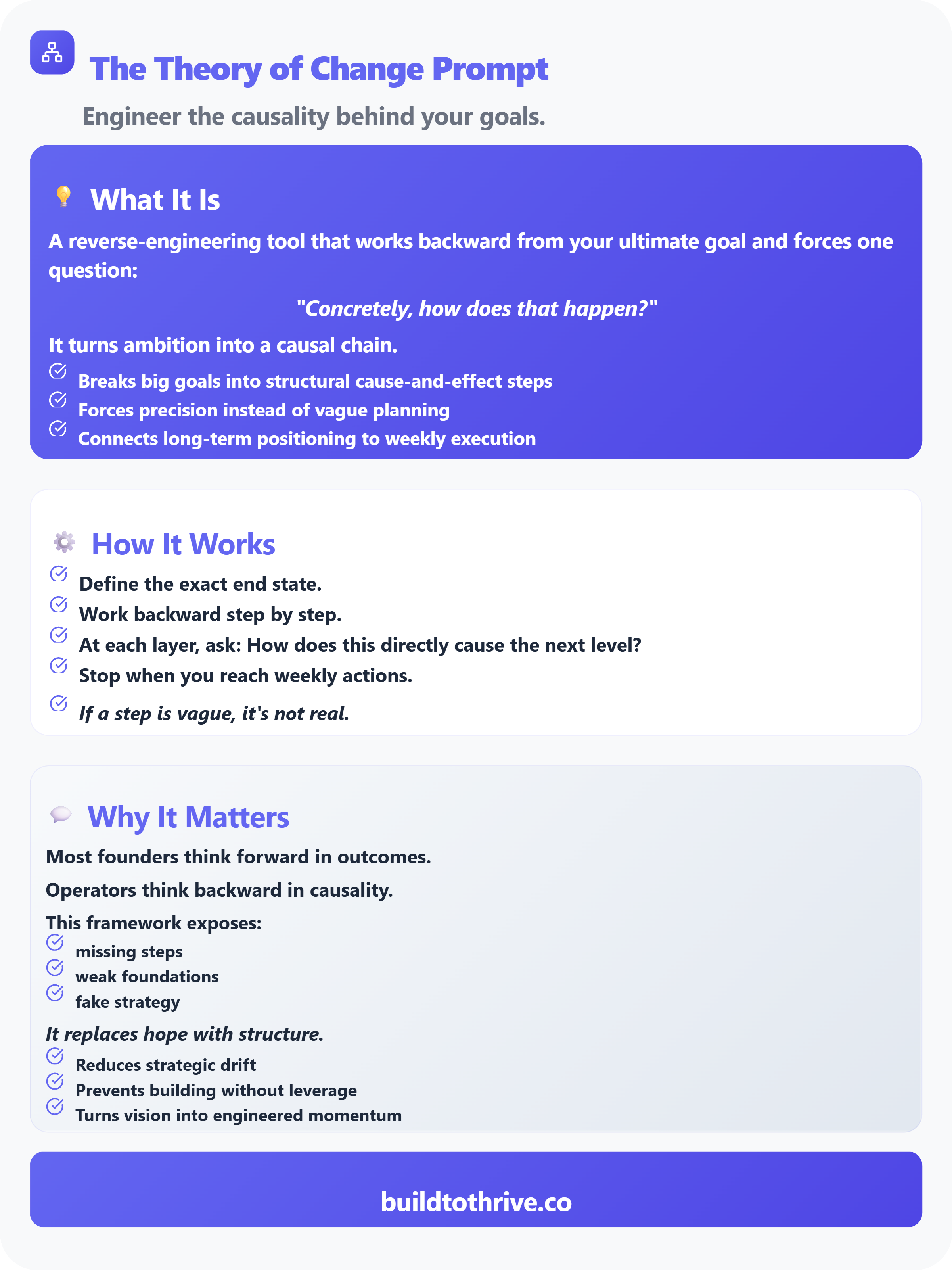
The Theory of Change
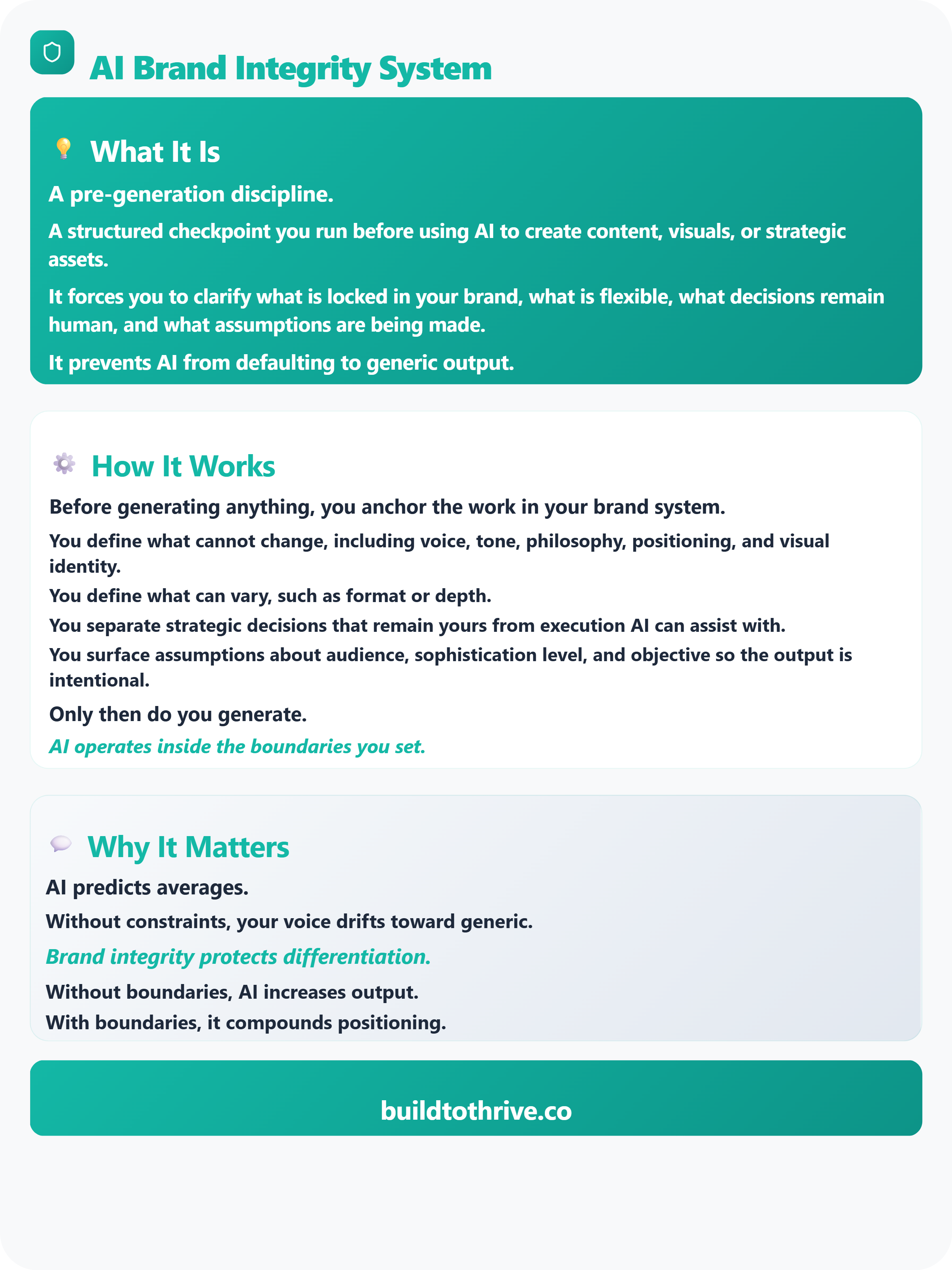
AI Brand Integrity
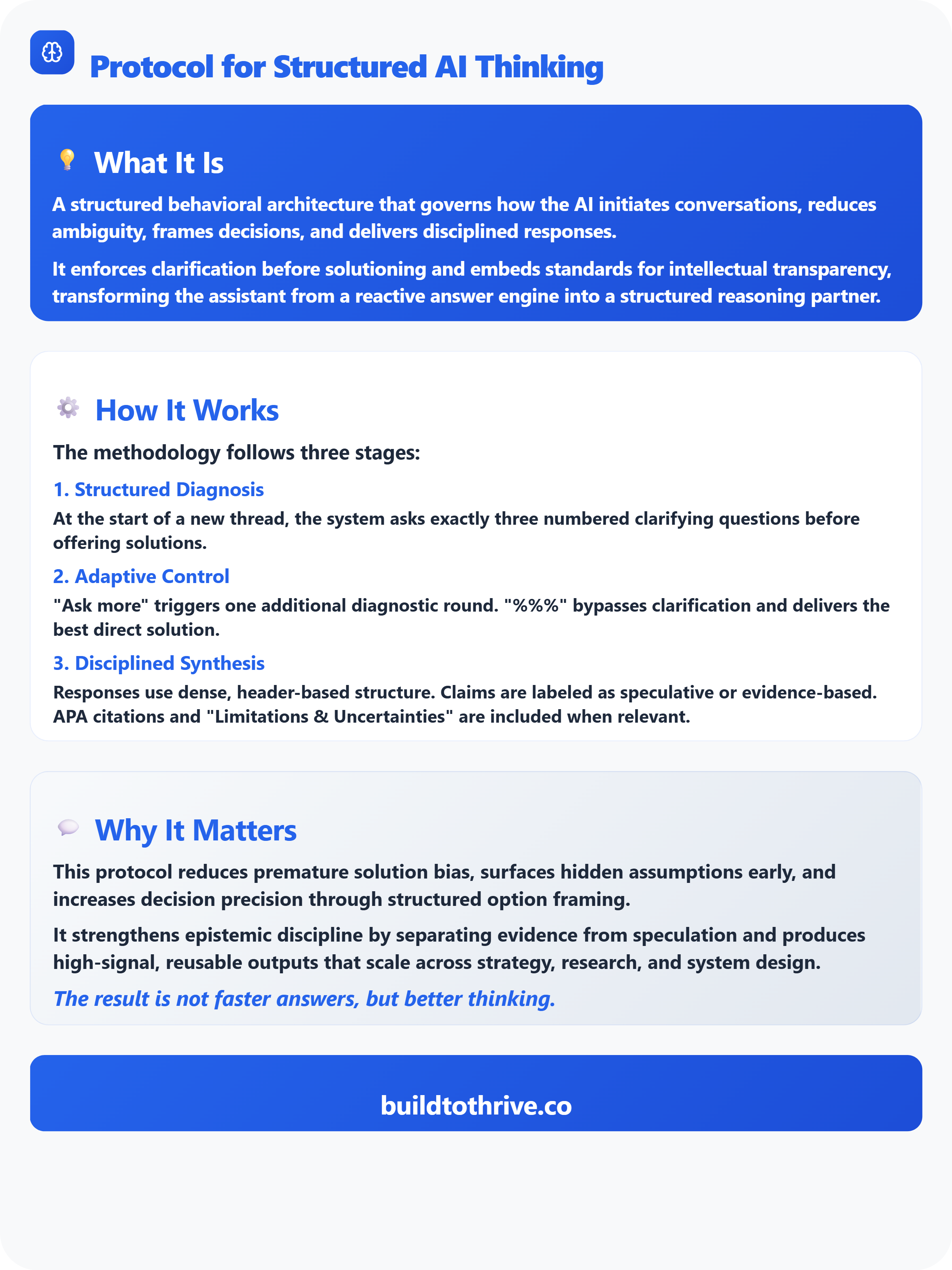
Protocol for Structured AI Thinking
Featured Articles
The Death of the High-Performer: Why Your Mastery is No Longer Your Security
Is This AI’s February 2020 Moment? The Real Debate About AI Acceleration and White-Collar Jobs
Capital Markets Narrative
5 Narratives shaping risk, margins, and valuation
Tool of the Week
How to 10x Research and Learning with NotebookLM
—🔴—🔴—🔴
Clarity Prompts
This week, I’m introducing three prompts that act like guardrails for thinking.
One helps you slow down reactive answers and structure better decisions when stakes are high or ambiguity is creeping in.
One is built for moments before you hit generate, when brand drift is a real risk and you need clear boundaries that keep positioning intact.
And one turns AI into a causal strategist, helping you reverse engineer bold goals into concrete weekly actions while avoiding vague plans that feel good but go nowhere.
—🔴
The Theory of Change Prompt
Startup Riders delivers a weekly breakdown of how top 1% startups actually raise capital and grow, with a clear investor lens on where funding is flowing, which companies are breaking through, and what the patterns mean for operators trying to win. Ivan brings range across the stack, from product at Meta to early startup execution, to building a business to meaningful ARR, and now reviewing thousands of deals per year as a venture investor at JME.vc. In a world where founders are drowning in fundraising advice that is either generic or outdated, this kind of grounded pattern-spotting is leverage.
If you are building and want a clearer view of how capital markets and breakout dynamics really work, this is a perspective worth following. You’ll get sharper context for your fundraising strategy, better instincts on what investors respond to, and a more realistic read on what “good” looks like when you are trying to grow
—🔴
AI Brand Integrity System
AI Flight Plan is a practical guide to AI adoption and governance for professionals who have to make AI work inside real organizations. It focuses on the unglamorous but decisive groundwork that happens before tools: governance, data, systems, and strategy. Karen brings an operator’s mindset shaped by 15+ years scaling strategy and operations across Big Tech, Fortune 500s, and high-growth startups, plus the discipline of a former U.S. Navy helicopter pilot. In a world where teams keep buying subscriptions without building foundations, AI turns into a black hole of fees and unused licenses.
If you are responsible for implementing AI and want ROI instead of chaos, this is a perspective worth following. You’ll get a clear sequence for adoption, practical steps for decision making under pressure, and a steadier way to separate durable playbooks from shiny distractions so your initiatives actually stick.
—🔴
Protocol for Structured Thinking
AI + Education = Simplified is Lance Eaton’s running notebook on what AI is doing to higher education when you zoom out past the tool talk and look at the real friction points: leadership tension, guardrails, uncertainty, access, and the human side of change. It blends policy-aware thinking (like AI syllabus and classroom boundaries) with reflective conversations and interviews that surface how educators are actually feeling and responding. In a world where campuses are being pressured to “adopt AI” before they’ve even agreed on what responsible use looks like, this kind of grounded sensemaking is rare.
If you work in higher ed and want help thinking clearly about GenAI without turning it into either panic or cheerleading, this is a perspective worth following. You’ll walk away with better questions, more usable framing for decisions, and a calmer way to navigate conversations with faculty, staff, and students when the stakes feel messy.
—🔴—🔴—🔴
Featured Articles:
The Death of the High-Performer: Why Your Mastery is No Longer Your Security
Is This AI’s February 2020 Moment? The Real Debate About AI Acceleration and White-Collar Jobs


—🔴—🔴—🔴
Capital Market Narratives
5 Narratives shaping risk, margins, and valuation
Over the last four weeks, the US tape hasn’t moved on “new AI features” so much as on interpretations, the repeatable stories that shape risk appetite, margin expectations, and how investors handicap winners and losers across sectors. Below are the five AI narratives that kept showing up in market chatter and commentary, with the skeptical counterpoint and the one takeaway worth carrying into your next call.
The “seat” is losing relevance
What the tape is saying: As agentic workflows spread, “pay per human user” looks shakier—investors are rethinking how durable SaaS revenue is when software can do work without a user.
Skeptical view: Seats don’t disappear overnight; procurement, controls, and change-management keep pricing sticky, and vendors can bundle/hybridize to defend ARR.
Investor signal: Underwrite pricing architecture (usage/outcome + guardrails), not “AI features.”
“AI productivity” is getting treated like a macro stabilizer
What the tape is saying: The market leans on “AI lifts productivity” as a reason growth can run without wage pressure re-accelerating.
Skeptical view: Diffusion is still uneven; macro narratives often get ahead of measurable adoption.
Investor signal: Watch margins vs labor costs, that’s where the story becomes real.
AI capex is a market-structure story (breadth, correlation, leadership)
What the tape is saying: A handful of mega-caps are setting the marginal pace of AI spending, shaping index earnings quality and “who leads” dynamics.
Skeptical view: Concentration is also fragility, if the spend is narrow, so is the market’s support.
Investor signal: Treat this as correlation + positioning, not just fundamentals.
Governance is moving from policy deck to budget line
What the tape is saying: AI risk controls (data governance, monitoring, auditability) are moving from “nice to have” to funded roadmaps.
Skeptical view: Some spend is checkbox theater until buyers demand controls that survive scrutiny and reduce real incident risk.
Investor signal: The “boring” control layer is becoming a durable spend category.
The layoffs narrative is shifting: “anticipation” vs “replacement”
What the tape is saying: More companies frame AI as efficiency and growth tooling—not a clean “AI replaced X jobs” story—changing how investors model opex.
Skeptical view: Workflow redesign is hard; savings often lag the talking points.
Investor signal: This is an operating leverage timing debate, not a binary headline.
Quick closing thought
If you’re tracking one thread across all five: the market is rotating from what AI can do to how it changes pricing, cost structure, and market structure, the stuff that actually moves multiples.
—🔴—🔴—🔴
Tool of the Week NotebookLM
NotebookLM is Google’s AI notebook: you add your documents (PDFs, Docs, web pages) and ask questions or get summaries grounded in those sources, with citations. It’s designed to help you study, write, and understand your own material faster, rather than answering from the open web.
I personally use it extensively to learn quicker, and even to illustrate my points as I teach others. This tool has become a centerpiece in my content creation business, and I can’t say enough about it, so I reached out to my friend and AI Prompt and workflow expert Wyndo.
He wrote a first piece about the tool here How I Learned Complex Topics 10x Faster with NotebookLM and then he added as the tool kept evolving.
Here is Wyndo:
Thank you Juan.
While I was focused on building AI automation workflows and exploring new AI tools, NotebookLM quietly added features that completely changed what’s possible. We’re not talking about minor updates—we’re talking about the ability to customize how AI teaches you based on exactly where you are in your learning journey.
And that changes everything when you’re trying to bridge the gap from no-code to actual development of building an agent.
So when I hit the wall with LangChain and RAG systems to build AI agent, I went back to NotebookLM. But this time, instead of just uploading sources and asking questions, I built a complete learning ecosystem that met me exactly where I was: consider me as an AI operator who understood AI concepts but had never built anything with agent development.
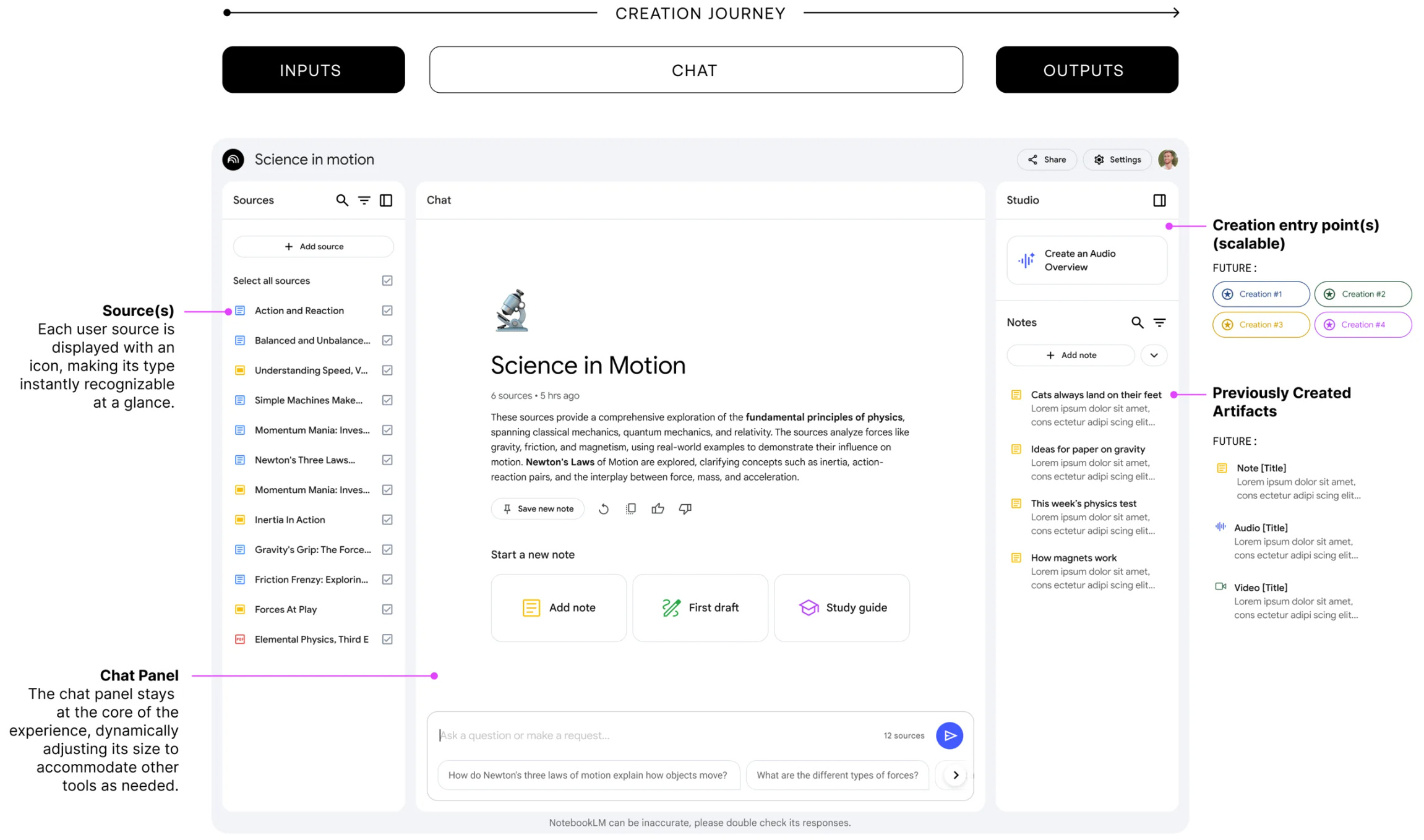
Before we continue, a quick shoutout for Jason Spielman, the artist and designer lead behind NotebookLM. His early sketches and experiments made today’s version possible. I was surprised by the complexity of the design—like watching a factory‑finished product arrive at your door, ready to use. If you enjoy the art of building a product, you might want to check out his NotebookLM’s early story.
It’s beautiful, I promise!
Now, back to the point.
Here’s what happened when I stopped trying to learn like a developer and instead built a system that matched how my brain actually works.
The learning system I built
Before I even started learning, I had to solve the first problem: What should I actually be reading?
When you’re learning something completely new, you don’t even know which sources are good. Google “LangChain RAG tutorial” and you get 10,000 results.
Which ones are for beginners? Which ones are outdated? Which ones assume knowledge I don’t have?
This is where NotebookLM’s “Discover” feature became my first breakthrough.
Phase 1: Curating the right sources (not just any sources)
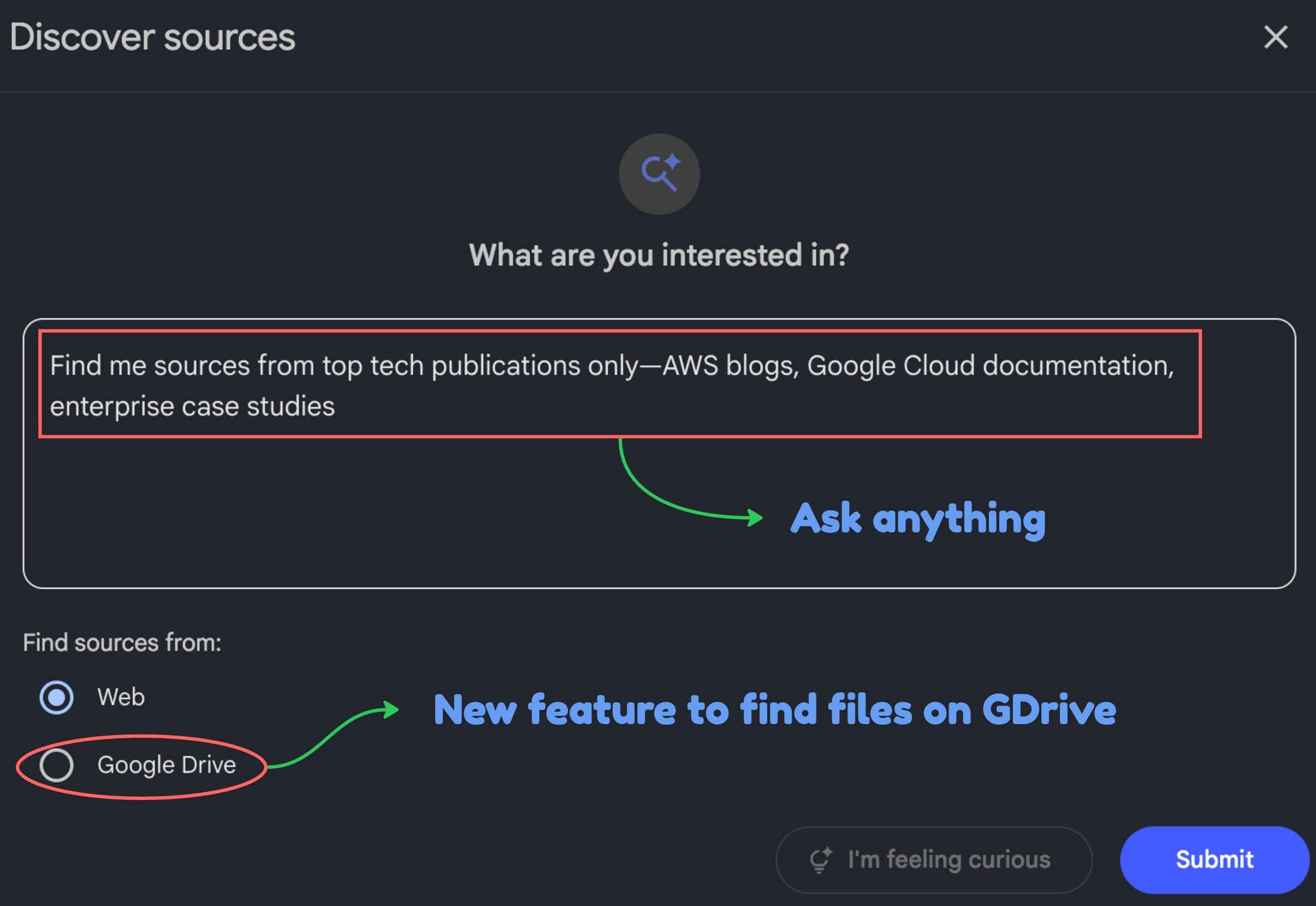
Most people don’t realize you can customize what kind of sources NotebookLM finds for you. Instead of just asking “find me information about RAG,” you can be specific about the SOURCE TYPE you need.
Here’s how I used Discover customization:
Customization #1
“Find me sources from Reddit only”
Reddit threads have real developers admitting what makes them confused. You get threads like “I’m a beginner trying to understand RAG, here’s what finally made it click.” These people usually one step ahead of you explaining their breakthroughs. Perfect for building initial mental models without making things complicated with buzzwords and jargons.
Customization #2
“Find me YouTube videos only”
YouTube has been my biggest learning source over the years because it usually has beginner guides I can easily follow. It’s also packed with content that can take you from beginner to intermediate.
Customization #3
“Find me official documentation PDFs from LangChain, OpenAI, and ChromaDB only”
Documentation is useless if you start here—it’s written for people who already understand basics. But once you have mental models from Reddit and YouTube, official docs suddenly make sense. Specifying “PDF only” or “from LangChain.com” prevents random blog posts and ensures authoritative sources.
Customization #4
“Find me sources from top tech publications only—AWS blogs, Google Cloud documentation, enterprise case studies”
These sources explain WHY companies build RAG systems and real-world architecture decisions. Once you understand HOW to build, you need production best practices, cost optimization, and security considerations that only enterprise sources cover.
By customizing the types of sources, I create a diverse set of materials to deepen my understanding of the topic I’m learning. This helps me avoid bias from any single publication and lets me see multiple perspectives, which makes my learning stronger than ever.
Additionally, you can use files in your Google Drive as sources. This is a new feature they recently added.
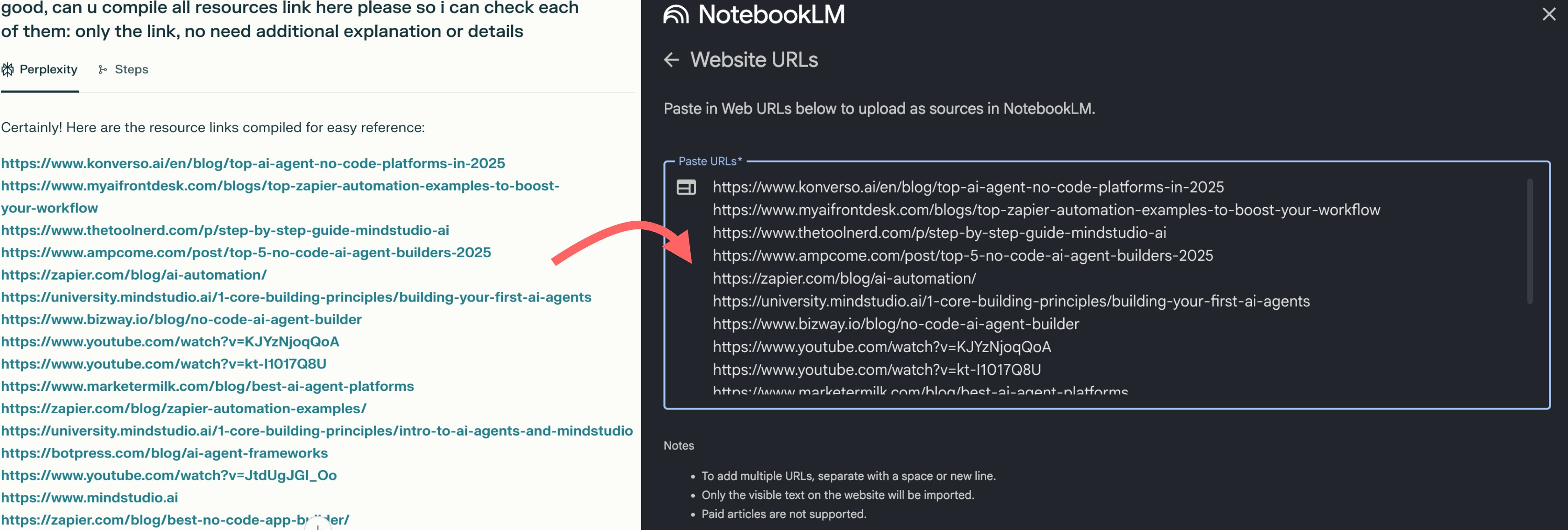
🚨 Pro tip: Want to level up your sources collection? Use Perplexity’s Deep Research to collect high‑quality sources, then ask it to compile the citations as raw links. Copy those links into NotebookLM as your source set. Now you’ve got a curated research hub, fast.
Phase 2: Building foundation through different learning styles
After curating my sources, I had the raw materials. Now I needed to actually learn from them. But here’s the problem: sitting down to read documentation felt overwhelming, and I had limited focused time each day.
This is where NotebookLM’s multi‑format generation shines. Instead of forcing one learning style, I matched formats to context—audio for commuting, video for visual clarity, and written reports for depth.
Let’s break them down.
1. Build the base with customized reports
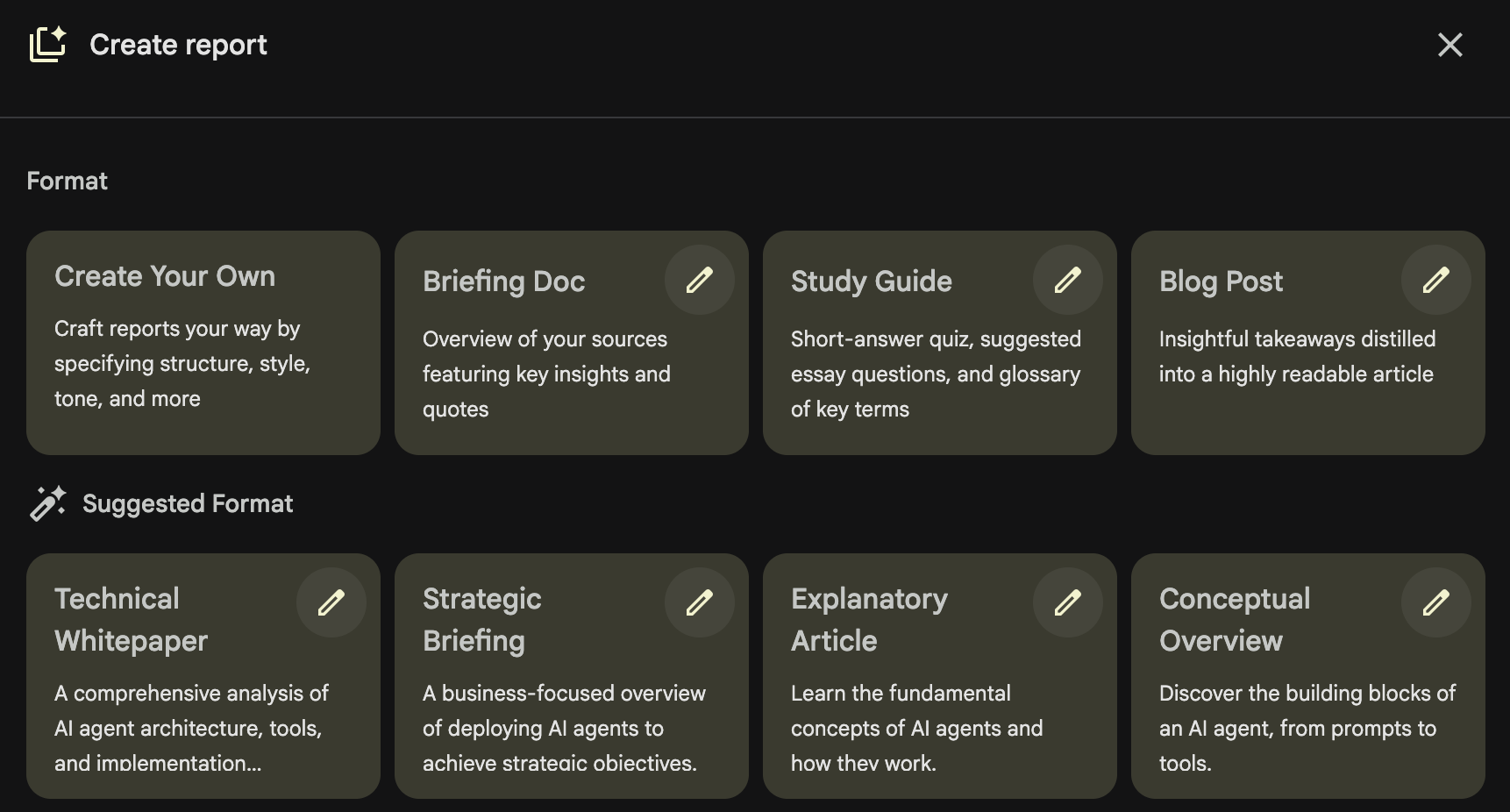
When I was about to learn something new, I didn’t even know what I didn’t know. Terms like “vector embeddings,” “semantic search,” and “retrieval pipelines” were everywhere, but I couldn’t tell which ones were essential vs nice-to-have.
NotebookLM has a Report feature with multiple formats: blog posts, briefing documents, study guides, and four additional auto‑suggested options based on the documents you upload. You can generate them using custom instructions or write your own.
But, I’d like to start from my own.
Here are some custom instructions you can follow to create your own report:
Customization #1: Anchor new knowledge to what you already know
Instruction:
“Explain [NEW TOPIC] by contrasting it with [SOMETHING I ALREADY UNDERSTAND]”
My example:
“Explain LangChain and RAG by contrasting them with how make.com work”
Why this worked: Instead of learning in a vacuum, I anchored new concepts to something I already understood.
NotebookLM explained: “In Make.com, you build workflows that follow predetermined steps. With LangChain, you’re building systems where the AI decides which steps to take based on the user’s question. Make.com is a recipe you follow exactly. LangChain is giving the AI ingredients and letting it cook.”
Suddenly, I understood why I needed to learn this differently.
Customization #2: Progressive complexity layering
Instruction:
“Start with the simplest possible explanation of [TOPIC], then layer in complexity”
My example:
“Start with the simplest possible explanation of RAG, then layer in complexity”
Why this worked: Prevented information overload on day one.
What I learned:
Simple version: RAG = giving AI access to your own documents so it can answer questions about them
Next layer: It works by converting documents into numbers (embeddings) and finding relevant chunks when users ask questions
Technical layer: Vector databases store embeddings, similarity search retrieves relevant chunks, LLM generates answers using retrieved context
Each layer built on the previous one instead of dumping everything at once.
Customization #3: Skill level progression map
Instruction:
“Explain this topic in 4 passes: (1) Absolute beginner with no jargon, (2) Intermediate with key terms, (3) Advanced with technical depth, (4) Expert-level insights about what most people get wrong”
My example:
“Used this to understand the progression from simple chatbot → documentation assistant → research agent”
Why this worked: Gave me a progression path instead of trying to build the advanced version immediately.
The clarity I gained:
Beginner: FAQ chatbot (needs: basic RAG, simple embeddings, single source)
Intermediate: Documentation assistant (needs: chunk optimization, multiple sources, metadata filtering)
Advanced: Research agent (needs: complex retrieval strategies, re-ranking, citation tracking)
Expert-level insights: AI agent is best use for specific case rather than a broad use
I realized I didn’t need to master everything—I just needed to build the beginner version first.
2. Audio overview to build a customized podcast
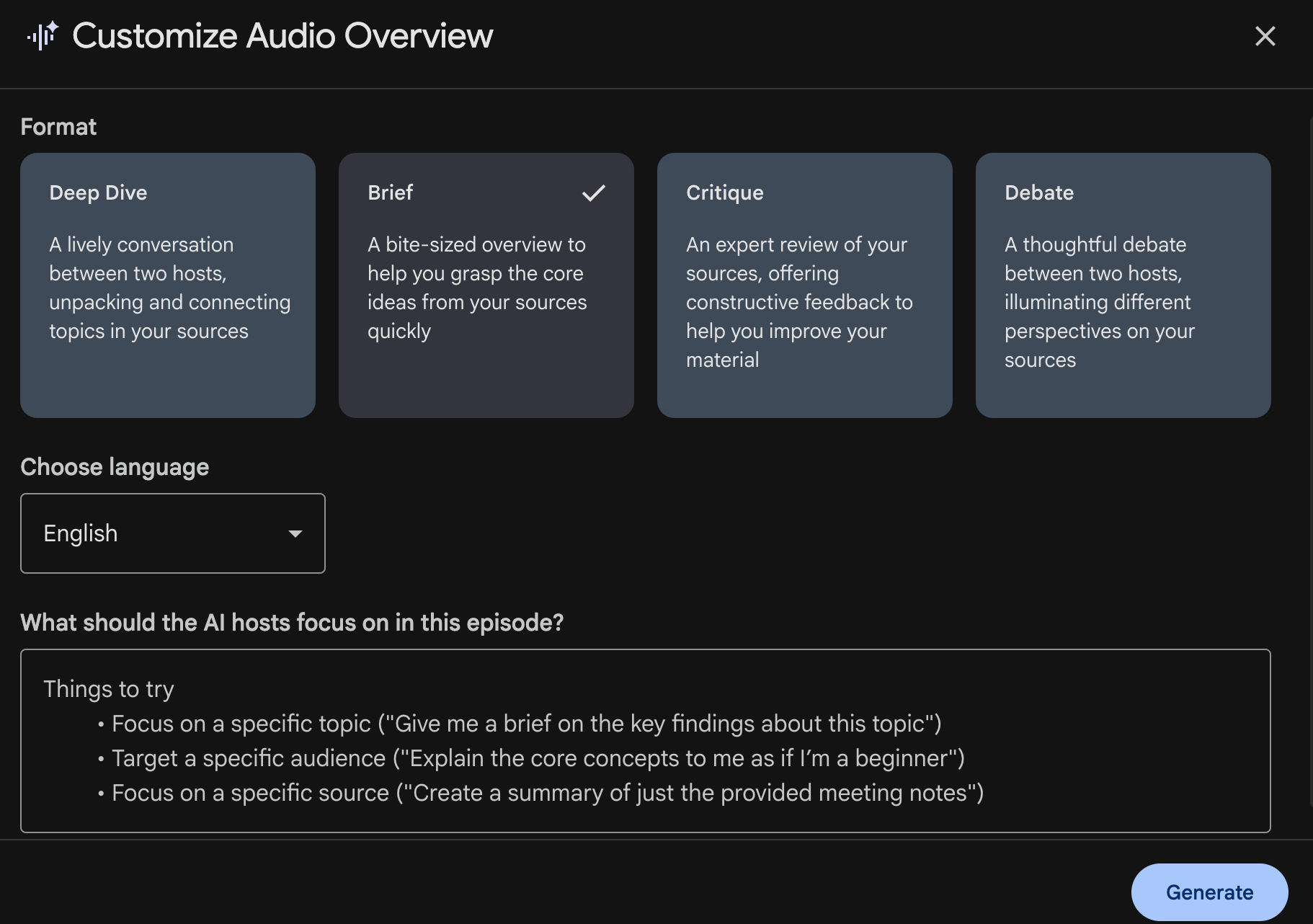
Now that I had absorbed the written report, but I needed reinforcement during “dead time.”
For example: my afternoon walk and gym sessions.
NotebookLM’s Audio Overview creates podcast-style conversations between two AI hosts. You can customize the format (Deep Dive, Brief, Critique, Debate), the length, AND the focus. And you can ask questions as it plays.
🚨 Pro tip: NotebookLM’s mobile app lets me listen on the go, but I want more control. I’d like to download the podcast and upload it to Spotify, so it’s one tap away and blends seamlessly with the playlists I already follow.
Here’s my three-podcast strategy that worked incredibly well:
Customization #1: Beginner interviewing expert
The setup:
Use “Deep Dive” format with default length.
Instruction:
Target a specific audience: Have the first host act as a complete beginner who knows nothing about [TOPIC], and the second host act as an expert. The beginner should interview the expert, asking basic questions someone new would actually ask.”
My example:
“Have the first host act as a complete beginner who knows nothing about AI agents, and the second host act as an expert. The beginner should interview the expert about building RAG systems.”
Why this works:
You hear YOUR actual questions being asked by the beginner host
The expert explains without assuming prior knowledge
The interview format feels natural, not like a lecture
What I heard:
Beginner: “Okay, but why can’t I just paste my documents into ChatGPT?”
Expert: “Great question! Here’s the problem with that approach...”
This felt like listening to myself learn in real-time.
Customization #2: Expert debate
The setup:
Use “Debate” format with default length.
Instruction:
“Have two experts debate different approaches to [TOPIC]. One argues for [APPROACH A], the other argues for [APPROACH B]. They should discuss tradeoffs, not just argue who’s right.”
My example:
“Have two experts debate whether beginners should start with simple RAG or jump straight to advanced retrieval strategies. Discuss the tradeoffs of each approach.”
Why this works:
Hearing both sides prevents you from thinking there’s only one “right” way
You learn decision-making frameworks, not just facts
Shows you what experienced people actually argue about
What I heard:
Expert 1: “Start simple so you understand fundamentals”
Expert 2: “But simple approaches create bad habits you have to unlearn”
Both: Discussion of when each makes sense
This helped me understand there are different paths I can pursue, not one perfect answer.
Customization #3: Expert critique
The Setup:
Use “Critique” format with default length.
Instruction:
“Have an expert review the sources and offer constructive criticism: What’s missing? What’s oversimplified? What do beginners commonly misunderstand from this material?”
My example:
“Have an expert review these RAG tutorials and point out what’s missing, what’s oversimplified, and what beginners commonly misunderstand.”
Why this works:
Reveals gaps in the sources you collected
Warns you about common misconceptions BEFORE you develop them
Shows you what to be skeptical about
What I heard:
“These tutorials make RAG look simple, but they skip chunk optimization entirely”
“Most guides don’t mention that your first RAG system will probably return bad results”
“Notice how none of these sources discuss cost implications”
This critique saved me from thinking I understood everything after the first two listens.
3. Visual clarity using customized video overview
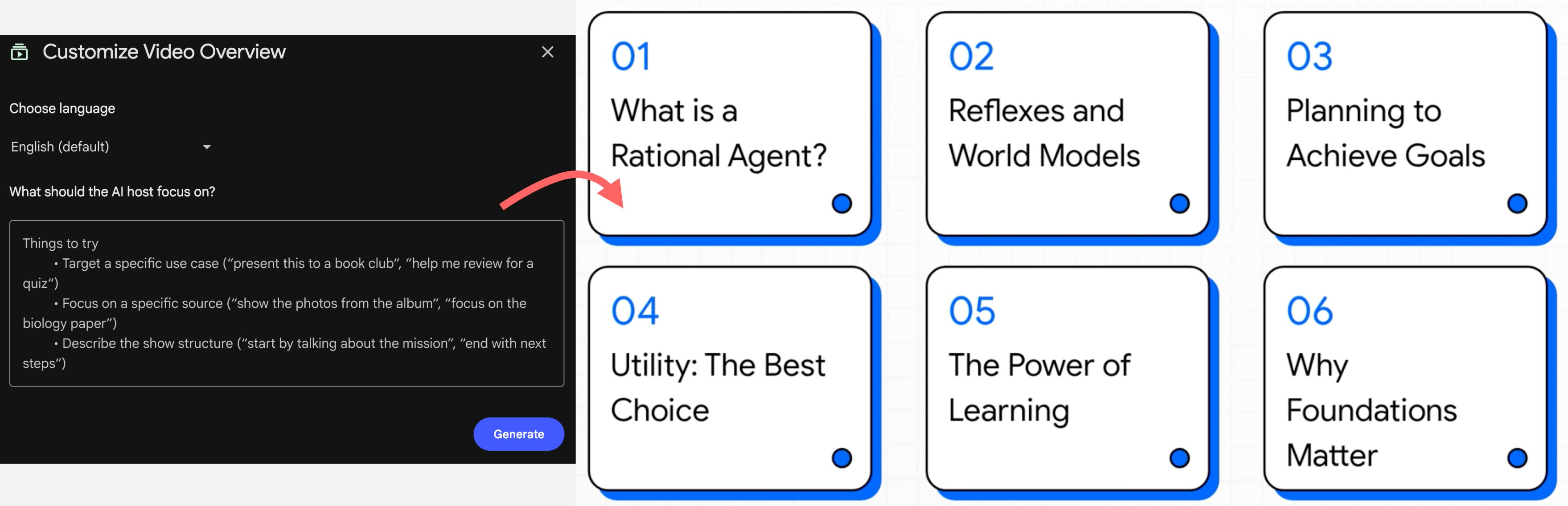
Now that I’ve understood the concepts by reading and listening, sometimes I still need someone to explain it like a 101 presentation, something that gets me up to speed and levels me up to more complex topics. This is where video comes into play.
NotebookLM’s Video Overview generates presentations with AI narration. For a visual learner, this can be your jam.
Here’s my three-video strategy that built on what I learned from the podcasts:
Customization #1: Structured learning path
Instruction:
“Describe the show structure: Start with what I need to understand first, then what comes next, then what comes after that. Organize by learning sequence, not by topic complexity.”
My example:
“Start with what RAG is and why it exists, then explain the core components I need to know, then show me the basic workflow, then end with what I should learn first vs what can wait.”
Why this works:
Text slides organize information in clear learning order
You see the big picture before diving into details
Narration explains each slide while you read
What I actually saw:
Slide 1: “What is RAG?” with 3-4 bullet points
Slide 2: “Core Components” listing embeddings, vector DB, retrieval, LLM
Slide 3: “The Basic Workflow” with numbered steps
No complex diagrams—just organized text that built understanding step by step.
Customization #2: Comparison table presentation
Instruction:
“Target a specific use case: Present this to help me choose between [OPTION A], [OPTION B], and [OPTION C] by comparing them across key factors like complexity, cost, time investment, and best use cases.”
My example:
“Present this to help me choose how to build AI agent by comparing complexity, when to use each, and what I need to learn for each.”
Why this works:
Simple text-based comparison slides show differences clearly
Narration walks through the tradeoffs while you read
Helps you make decisions, not just consume information
What I actually saw:
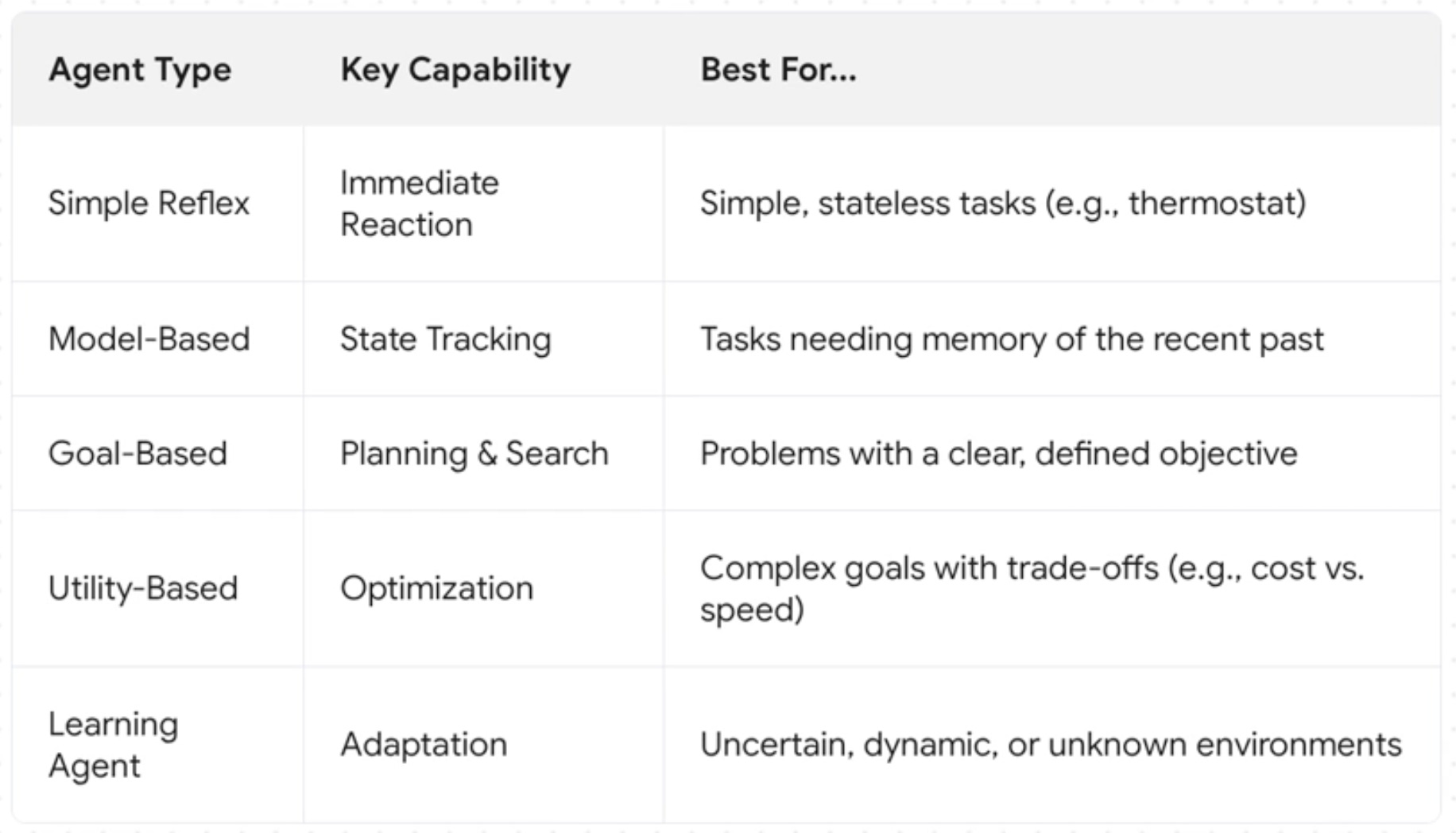
Slide showing three columns with agent type, capability, and best for
The AI narrator explains deeper out of the slide
Table highlighting key differences
The visualization works well to help me choose my path. I could see how I would approach building my AI agent.
Customization #3: Mistake prevention checklist
Instruction:
“Focus on a specific topic: Create a presentation listing the most common mistakes beginners make with [TOPIC]. For each mistake, explain what goes wrong and what to do instead.”
My example:
“List the most common mistakes beginners make building RAG systems. For each mistake, explain what goes wrong (like using chunks that are too small or too large) and what to do instead.”
Why this works:
Slide-by-slide checklist format is easy to reference later
Text clearly states mistake → consequence → solution
Prevents hours of debugging obvious problems
What I actually saw:
Slide 1: “Mistake #1: Chunk Size” with bullet points explaining the problem
Slide 2: “What Happens” describing bad retrieval results
Slide 3: “What to Do Instead” with specific guidance
This presentation became my troubleshooting reference guide whenever I found problems.
Phase 3: Test your knowledge by validating what you think you know
After absorbing information through reports, podcasts, and videos, I thought I understood AI Agent and RAG systems. I could explain concepts when reading about them. I could nod along when hearing explanations.
But, I need to be tested to ensure I’ve understood the whole concept.
This is where NotebookLM’s testing features revealed the gaps between “I think I know this” and “I actually know this.”
1. Use Flashcards to test my understanding
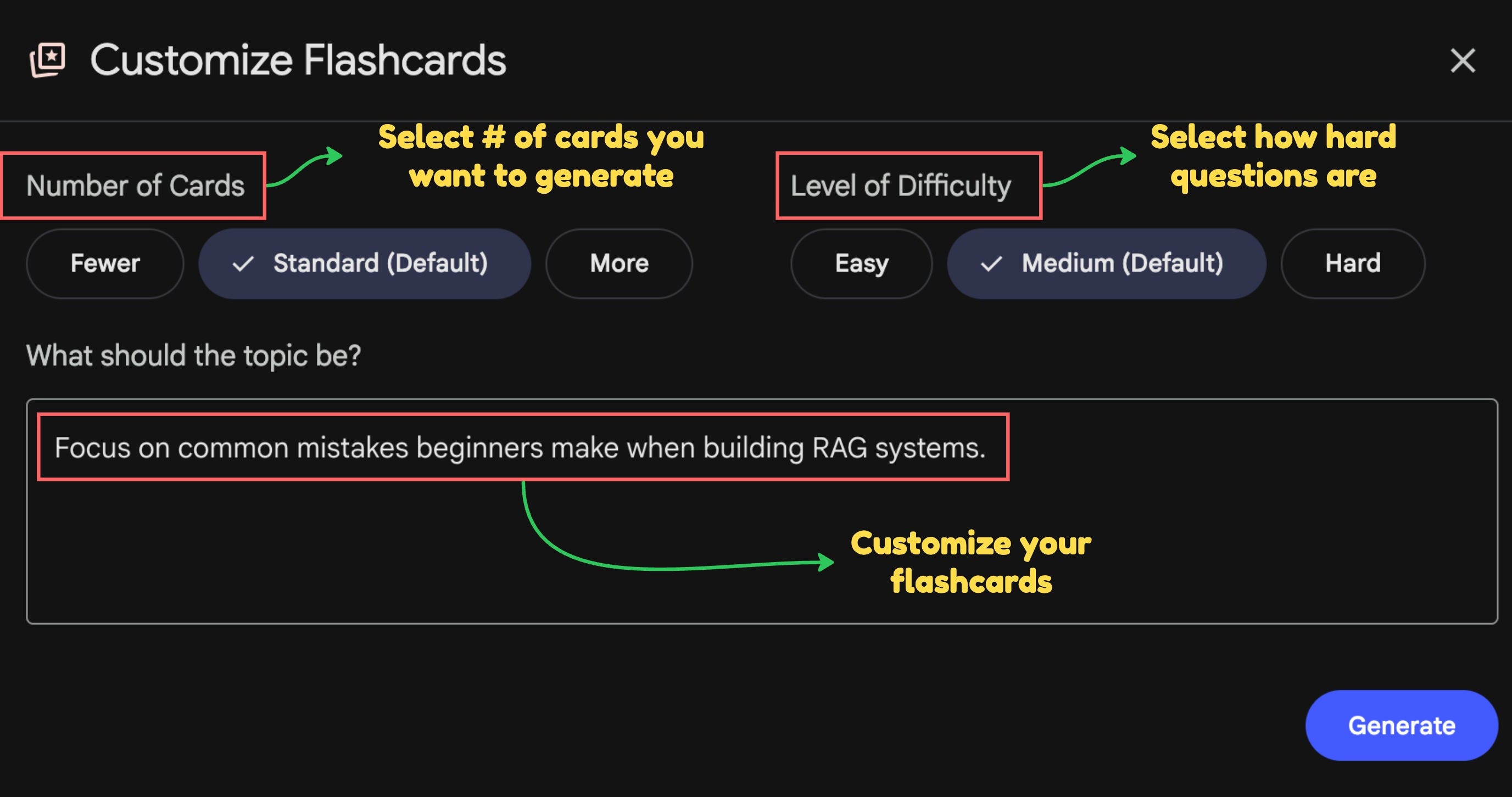
I thought I understood concepts, but when I tried to implement, I realized I was just memorizing definitions without actually understanding how things worked together.
NotebookLM’s flashcards let you generate cards with custom instructions and ask for explanations on any answer. You can choose how many cards to make and dial the difficulty up or down. Net result: a highly tailored learning session.
Here’s how I used flashcard customizations strategically:
Customization #1: Scenario-based testing
Instructions:
“Create scenario-based flashcards that test my decision-making about [TOPIC], not just definitions. Present real situations where I need to choose the right approach.”
My example:
“Create scenario-based flashcards that test my decision-making building a RAG AI agent, not definitions”
Why this works:
Forces you to APPLY knowledge, not just recognize it
Reveals whether you understand WHEN to use what you learned
Exposes gaps in practical understanding
Example card I got:
“A user uploads a 200-page PDF manual and wants to ask questions about it. Do you need: (a) fine-tuning, (b) RAG, (c) prompt engineering, or (d) function calling?”
I confidently answered “prompt engineering” because I thought you could just paste the content in the prompt.
Wrong.
The answer was RAG because 200 pages exceeds context windows and you need retrieval to pull relevant sections. This flashcard revealed I didn’t actually understand when RAG was necessary vs optional.
Customization #2: Common mistakes for beginners
Instructions:
“Focus on common mistakes beginners make with [TOPIC]. Create flashcards that test whether I can identify what’s wrong and why.”
My example:
“Focus on common mistakes beginners make when building an AI agent”
Why this works:
Prepares you for problems before you encounter them
Tests understanding of failure modes
Builds troubleshooting intuition
Example card that saved me from future headaches:
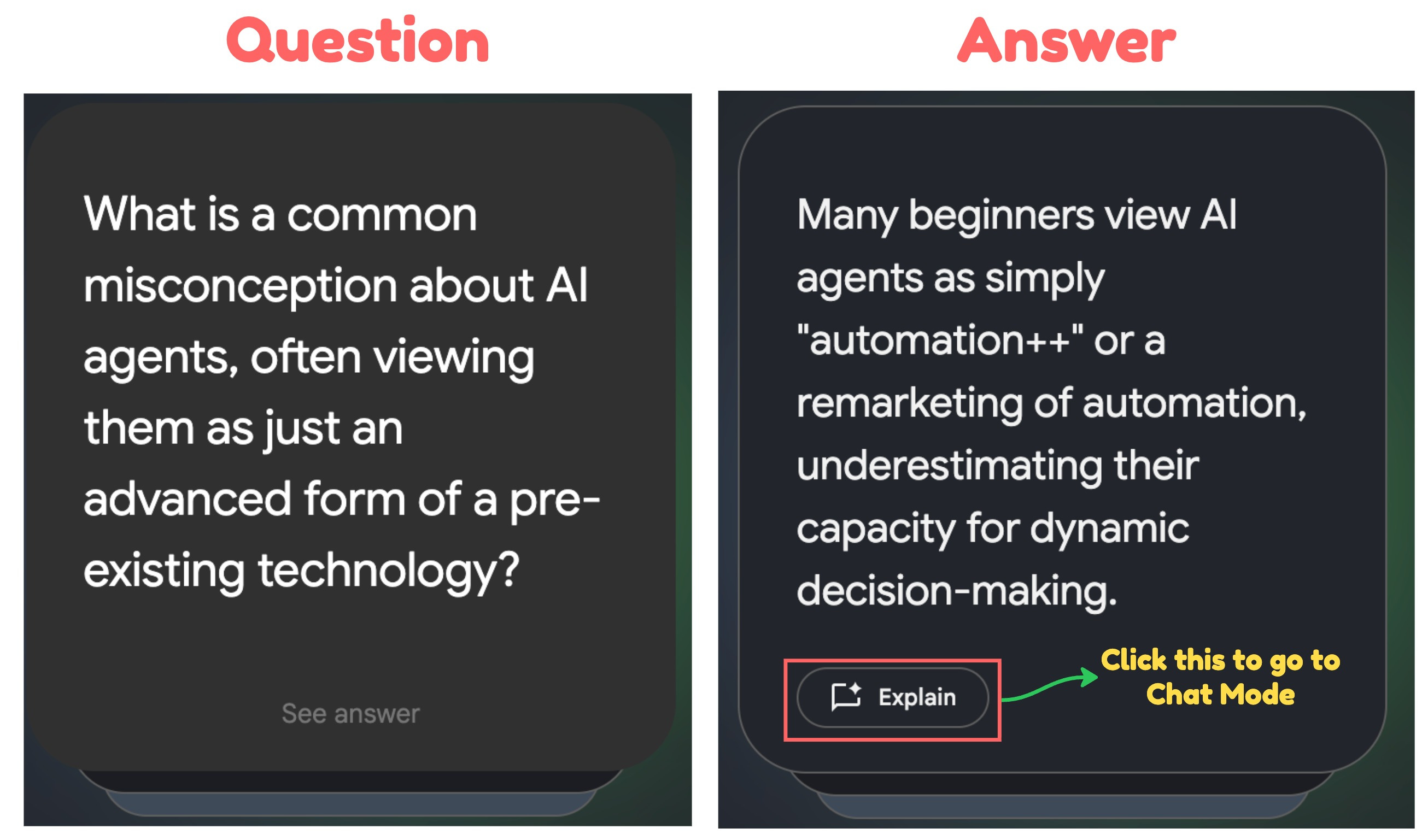
See? The flashcards are fully tailored to my custom instructions. If I want to ask about the reasoning behind an answer, I can click “Explain,” and it will take me to the Chat section where I can explore more.
Customization #3: Learn terminology for better understanding
Instructions:
“Create flashcards for the specific terms I keep confusing in [TOPIC]. Ask me to explain the difference between similar concepts in one sentence each.”
My example:
“Create flashcards for the specific terms I keep confusing: embeddings vs vectors vs vector databases, semantic search vs keyword search, retrieval vs generation.”
Why this works:
Clarifies terminology blocking your comprehension
Forces precise understanding, not vague “I kind of get it”
Makes documentation suddenly readable
The terminology that was blocking me:
“Explain the difference between embeddings, vectors, and vector databases in one sentence each”
Embeddings = converting text into numbers
Vectors = those numbers in array form
Vector databases = storage systems optimized for finding similar vectors
“What’s the difference between semantic search and keyword search?”
Keyword = finding exact word matches
Semantic = finding meaning matches (even with different words)
Getting this terminology straight made reading documentation 10x easier.
2. Quiz it: test how the ideas apply and connect
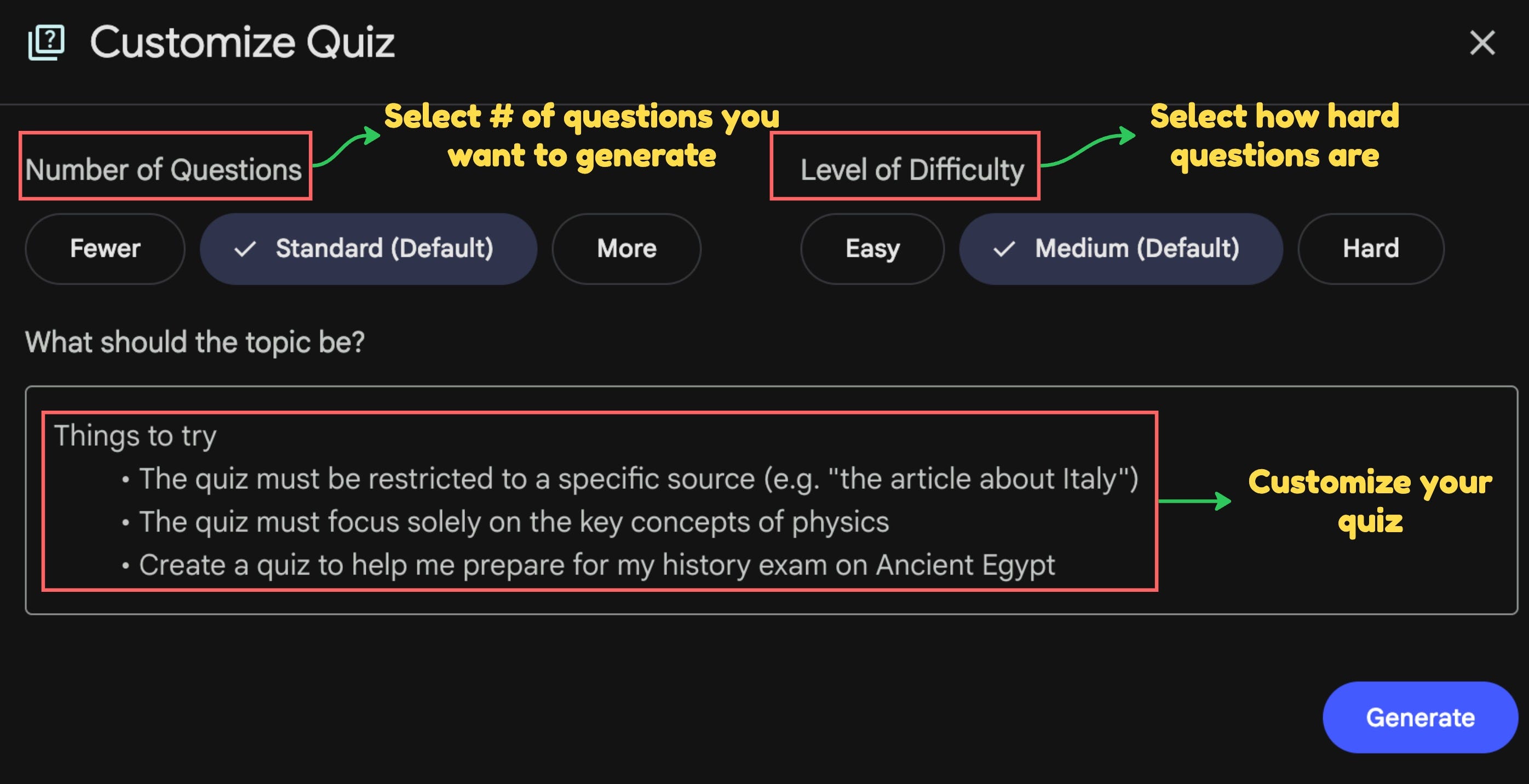
If you’re like me, you’re not satisfied with just flashcards. You’ll look for other ways to test your understanding of the new topics you’re learning. That’s why I tuned the quiz to stress‑test harder and reveal whether I can synthesize knowledge and solve real problems.
NotebookLM’s Quiz feature generates multiple-choice questions with explanations. Unlike flashcards which don’t provide answer options.
Here’s my quiz customization strategy:
Customization #1: Integration testing across concepts
Instructions:
“Create quiz questions that require me to combine multiple concepts from [TOPIC] to solve problems. Don’t test concepts in isolation—test whether I understand how they work together.”
My Example:
“Create quiz questions that require me to combine multiple RAG concepts—embeddings, chunk size, retrieval quality, and LLM generation—to solve real implementation problems.”
Why this works:
Tests whether you understand the SYSTEM, not just parts
Reveals gaps in how concepts connect
Prepares you for real-world complexity where nothing works in isolation
Example question I got: “Your RAG chatbot returns accurate information but users complain answers lack context. The issue is most likely: (a) Wrong embedding model, (b) Chunk size too small, (c) Vector database error, (d) LLM not understanding the question”
I guessed (a) because embedding seemed most technical.
Wrong.
Answer: (b) Chunk size too small—retrieves precise matches but loses surrounding context needed for complete answers. This question revealed I didn’t understand how chunk size affects answer quality, only that it affects retrieval.
Customization #2: Tradeoff decision testing
Instructions:
“Create quiz questions about the tradeoffs in [TOPIC]. For each question, make me choose between options where each has valid pros and cons—there’s no universally ‘correct’ answer without context.”
My Example:
“Create quiz questions about architectural tradeoffs in RAG systems. Make me choose between options based on different priorities like speed vs accuracy, cost vs quality, simplicity vs power.”
Why this works:
Prepares you for real decisions with no perfect answer
Tests understanding of WHY you’d choose each option
Builds decision-making frameworks, not just knowledge
Example question I got: “For a chatbot answering 10,000 questions/day, which approach balances cost and quality: (a) Retrieve 3 chunks with high-quality embeddings, (b) Retrieve 10 chunks with standard embeddings, (c) Retrieve 1 chunk with re-ranking, (d) Retrieve 5 chunks with hybrid search”
This wasn’t about “right” answer—it was about understanding the tradeoff:
More chunks = better context but higher cost
Better embeddings = better retrieval but slower/expensive
Re-ranking = improved relevance but added complexity
Hybrid search = best results but most expensive
The quiz forced me to think through implications, not just pick the fanciest option.
Customization #3: Failure mode prediction
Instructions:
“Create quiz questions asking me to predict what will break or fail in [TOPIC]. Present scenarios and ask what problem will occur and why.”
My Example:
“Create quiz questions asking me to predict what breaks when building AI agent systems. Present implementation scenarios and ask what problem will occur.”
Why this works:
Builds debugging intuition before you need it
Tests understanding of how systems fail, not just how they work
Prepares you for troubleshooting real problems
Example question I got:
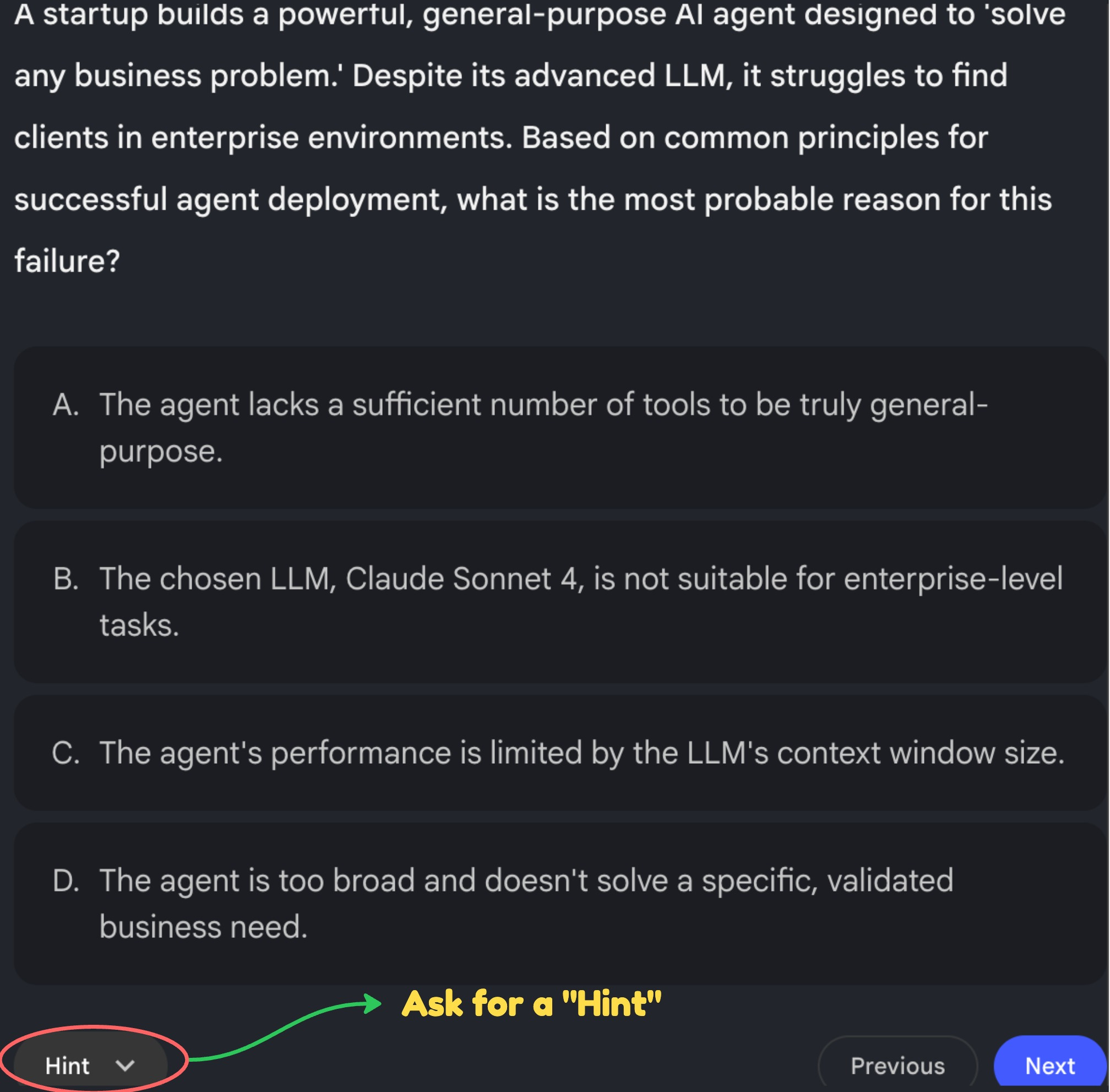
The correct answer was D because specificity is necessary to build an AI agent that actually solves business problems and meets real needs.
If you’re unsure about your answer, ask for a hint. It’ll nudge you toward the right one.
What actually changed
After a week of learning this, I finally understood exactly what I need to know right now versus what I can figure out later. I can start building my AI agent chatbot for my newsletter, so readers get full access to my knowledge—pulling resources across my newsletter and social notes—whenever they want to learn or explore my content archives.
Here’s what surprised me most about this whole process:
I thought NotebookLM’s new features were about generating different formats. Podcast, video, flashcards, quiz—just more ways to consume the same information, right?
Wrong.
Each format solved a different learning problem I didn’t even know I had:
Reports gave me the foundation, but I wasn’t going to re-read them during my commute.
Podcasts let me learn while walking, but I couldn’t visualize how components connected.
Videos showed me the structure, but I thought I understood more than I actually did.
Flashcards revealed I was just recognizing answers, not truly understanding them.
Quizzes exposed that I couldn’t actually apply what I’d learned.
What I realized was all features were built to customize my learning needs by meeting them where I was.
Six months ago, I wrote about NotebookLM as a learning tool. That post became my most popular because readers connected with the idea of turning AI into a personalized learning system instead of following generic tutorials.
But what I didn’t realize then—and what I understand now—is this:
The future of learning isn’t about AI teaching you.
It’s about you teaching AI how to teach YOU.
Every customization I shared in this post was me telling NotebookLM where my knowledge gaps were, how my brain makes connections, what learning style works for my situation. The AI didn’t magically know this. I had to design my own learning path.
And honestly? That’s the real skill worth developing.
If you’re trying to learn something complex right now, whether it’s AI development like me, or marketing, or fitness, or anything else, stop forcing yourself through tutorials that weren’t designed for where you are.
Instead, think about:
What do you already know that you can anchor this new thing to?
Where are you actually confused right now?
Are you testing if you recognize information or if you can actually apply it?
Then use NotebookLM’s customization to build the learning system you need.
The prompts I shared aren’t magic formulas. They’re examples of designing learning that matches where you are and where you’re trying to go. Your customizations will look different because your learning needs are different.
And that’s exactly the point.
—🔴—🔴—🔴
Thanks for reading Build to Thrive! This post is public so feel free to share it.
I use this space to share ideas and voices that help founders and creators think more clearly, act more intentionally, and build systems that last.
My work focuses on helping entrepreneurs bring order to growth and clarity to complexity, moving from chaos to control, and from control to sustainable growth.
Some resources you might like to try:
See your system. Find your leverage. Evaluate the key drivers of long-term performance
Discover which operating challenges are getting in the way of business growth
Upcoming Workshop for Professionals thinking about going solo
Some reader’s favorites
How Anthropic Set Off a Trillion-Dollar Software Repricing | Agentic AI and the Future of SaaS
AI Agents Are Now Hiring Humans: The Rise of RentAHuman and the Agent Economy
AI Agents Just Built Their Own Social Network. Humans Are Not Allowed to Post.
Build to Thrive | The AI Blueprint | Week of February 2nd, 2026
How I Scaled My Business Without Hiring: Building My First AI Agents for $0
Thanks for sharing this Juan!
Glad to know my notebookLM has been helpful! :)
The way you frame this feels like a turning point piece: not “another AI roundup,” but a clear argument that the real game has shifted from doing the work to designing the systems that do the work.
I especially liked how you connect agentic tools, capital markets narratives, and NotebookLM into one through-line: leverage now comes from defining problems, architecting workflows, and reducing uncertainty for others, not competing harder at execution in a collapsing-cost environment.