


Editorial
A smaller audience that knows your work, respects your judgment, and shares your professional context is often far more valuable than a massive anonymous following.
That realization has shaped how I’ve been thinking about this newsletter.
Nine months ago, after 25 years building businesses across four different sectors, I started this newsletter without a very clear niche. I knew the themes I cared about: building businesses, social development, entrepreneurship, resilience, leverage, and the impact AI would have on professional work. But I hadn’t fully clarified who I was writing for.
Over time, the signal became clearer.
The people consistently engaging with this work tend to share something in common: deep professional experience. Operators who have spent years building companies, leading teams, closing deals, or developing expertise that took decades to accumulate.
For many of them, the arrival of AI created a strange moment of identity lag.
The tools moved fast. The narrative around “AI natives” moved even faster. Yet many experienced professionals suddenly found themselves asking a quiet question:
Where does my experience fit in this new landscape?
Many of these readers belong to a generation that built their careers long before tools like ChatGPT appeared. In fact, if we look at Gen X alone, the youngest among them were already 42 years old when generative AI entered the mainstream.
But what I’m seeing is not resistance.
It’s curiosity.
A desire to understand how experience, judgment, and networks can compound with AI rather than be replaced by it.
In many ways, that reflection mirrors my own journey.
These are also the kinds of professionals I’ve come to understand most deeply through years of coaching founders and operators. Many of them have taught me as much as I’ve helped them, and I’m deeply grateful for that.
The Substack community has also played an important role in this process. Through conversations, comments, and shared ideas, many of you have helped shape the direction of this publication, and I deeply appreciate the value of that exchange.
So over time this publication has naturally become a place for that kind of reader. People who still see themselves as builders, who want to understand the shift happening around them, and who are looking for practical ways to turn their experience into leverage in the AI era.
The ones who work tirelessly, quietly, and with intention.
The ones who keep showing up when the work is hard and the outcome is uncertain.
Let’s all Build to Thrive.
—🔴—🔴—🔴
Reader Favorites
How Anthropic Set Off a Trillion-Dollar Software Repricing | Agentic AI and the Future of SaaS
AI Agents Are Now Hiring Humans: The Rise of RentAHuman and the Agent Economy
How I Scaled My Business Without Hiring: Building My First AI Agents for $0
4 Ways NotebookLM Will Supercharge Your Research
Everyone’s Rushing to AI. Few See the Ceiling Ahead.
—🔴—🔴—🔴
In this edition
Prompts
Sales Prompt: Account Signal Hunter
Finance Prompt: Financial Report Prompt
Featured Articles:
Going Fractional Series: Portfolio Careers in the age of AI. w/Alen Randall Kittredge, Juan Salas-Romer and Katie Barnes
How Anthropic recent study proves what many professionals are quietly sensing
Tool:
Claude Cowork Plugins and the Rise of the Personal Operating System
—🔴—🔴—🔴
Clarity Prompts
This week, I’m introducing two prompts that act like guardrails for thinking when work gets messy or high stakes.
One helps you turn a raw general ledger export into a clean fiscal-year report, for finance teams who need a clear revenue and expense view without fixing spreadsheets after the fact.
One is built for sales reps researching target accounts under time pressure, enabling them to spot real buying signals and red flags before sending a single outreach
The other turns AI into a skeptical deal and data reviewer, helping you pressure-test assumptions early while avoiding bad setups that create hours of rework later.
Account Signal Hunter
By John Attar | The Lucky Seller
The Lucky Seller is a newsletter by John Attar that shares practical lessons from his journey from SDR to sales leader in tech and data sales. Drawing on real experience and multiple President’s Club wins, it focuses on the small behaviors, mindset shifts, and tactical habits that separate average reps from top performers.
If you want to improve your performance in sales, understand the realities behind high-performing reps, and learn practical strategies to build pipeline, close deals, and grow into leadership, then this newsletter is designed for you.
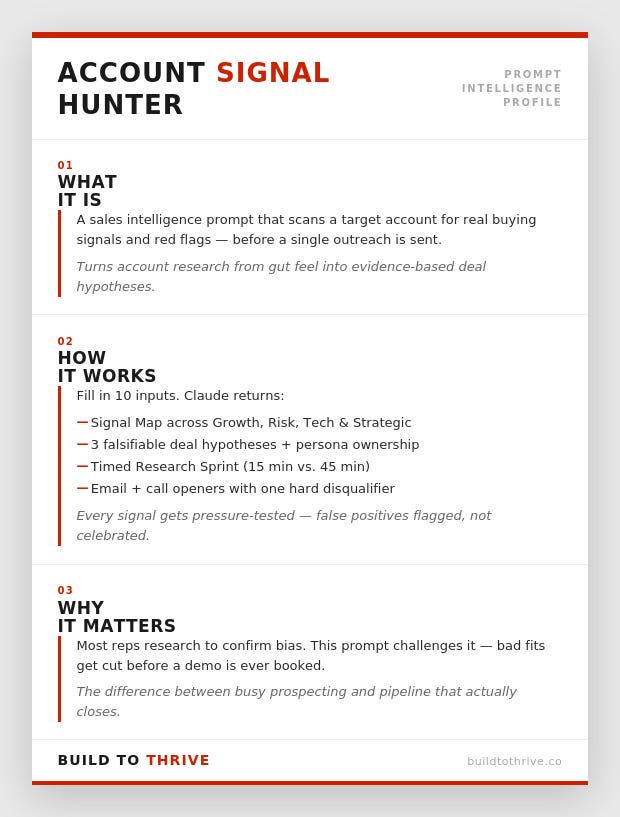
—🔴
Account Signal Hunter
Gannon Capital’s newsletter delivers deep-dive investment analysis on companies shaping the future of technology, finance, and industry. Posts explore businesses like AMD, Shopify, Rocket Lab, Coinbase, and SoFi, alongside thematic pieces on AI, defense, fintech, and emerging market shifts. It blends macro trends, business strategy, and portfolio insights to uncover asymmetric investment opportunities.
If you enjoy understanding how great businesses work, spotting long-term technological shifts, and learning how investors build conviction around high-potential companies, then this newsletter will be especially valuable to you.
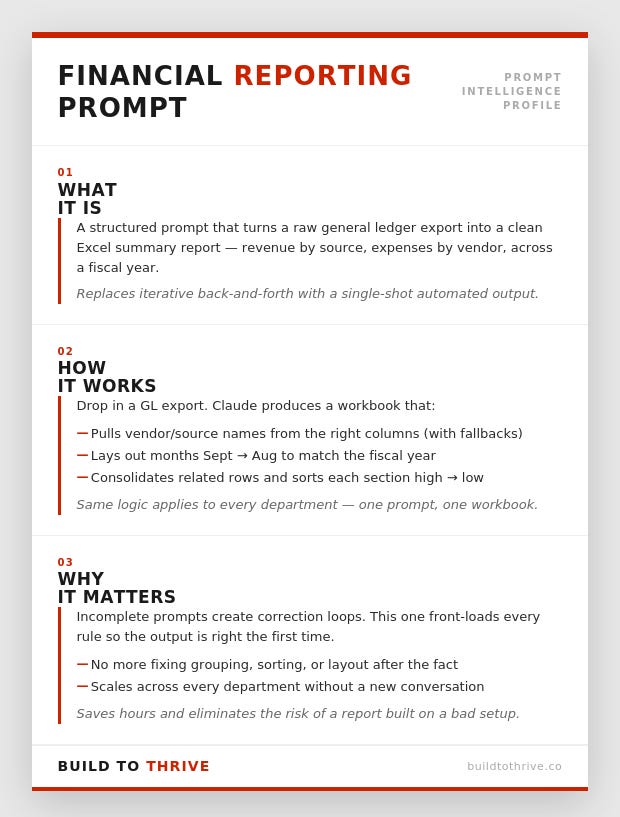
—🔴—🔴—🔴
Featured Articles:
How Anthropic recent study proves what many professionals are quietly sensing


—🔴—🔴—🔴
Claude Cowork Plugins and the Rise of the Personal Operating System
Why I Recommend Claude Cowork for Professionals and Operators
I recommend Claude Cowork to professionals and operators because it helps turn expertise into systems. Most experienced founders and operators have valuable frameworks in their heads, but they still execute those processes manually every time. Cowork allows you to package those workflows into repeatable operating systems that can run on demand. Instead of using AI for isolated tasks, you begin using it to execute your process. That shift moves you from doing more work to building leverage, which is exactly where experienced professionals create value in the new AI economy.
For the past year, most people have been using AI one prompt at a time, writing emails, summarizing documents, generating ideas. Useful, but still incremental.
The next phase is different.
Instead of using AI for isolated tasks, professionals are beginning to package their expertise into repeatable workflows that AI can execute on demand. In other words, turning what they know into systems.
That shift is exactly the kind of leverage we talk about here.
Recently, my Substack colleague and AI wizard Daria Cupareanu published one of the clearest explanations I’ve seen of how this works through a new feature called Claude Cowork Plugins.
In her article, she walks through what these plugins are, how they function, and how they allow you to bundle instructions, tools, and workflows so Claude becomes specialized in your process — not just a general assistant.
She also breaks down a custom plugin she built for her own writing workflow and shows how anyone can build something similar for their own work.
Here’s how she explains it.
Last week we deep dived into Claude Cowork. This week I’m covering Cowork Plugins the feature behind the $285 billion “SaaSpocalypse” that makes Claude a specialist in your work, not just an assistant. I’ll walk you through all 11 official plugins and demo my favorite.
The feature that wiped $285 billion off the stock market
On January 30, 2026, Anthropic added plugins to Claude Cowork and open-sourced 11 of the plugins their team uses to everyone with a paid Claude subscription.


The next day, $285 billion in market value vanished from software stocks. Thomson Reuters had its worst day on record. LegalZoom, Wolters Kluwer, ServiceNow, Adobe, they all got hit.
Analysts at Jefferies called it the “SaaSpocalypse”.
And all of this because of plugins. Not a new AI model. Not some breakthrough in reasoning. Plugins. Bundles of instructions that teach Claude your process, connect it to your tools, and make it work for you.
The reason Wall Street panicked is actually pretty simple: plugins let anyone build what used to take a SaaS company, a dev team, and a few million in funding.
Someone on your team reviews contracts against the same 15 clauses every time? That’s a plugin. Your sales team follows a 6-step outreach process? Plugin. You edit every article through the same checklist? Also a plugin.
I know, because I built one for my writing.
But before I show you how, let’s talk about what plugins are, why they matter, and the critical steps you shouldn’t skip before building your own.
What are Cowork Plugins?
You might have used Cowork before by giving Claude instructions and getting things done. Plugins take that further. You set up the workflow once, and from that point on, one command triggers an entire agentic process and hands you back the finished work.
A plugin bundles four components into one unit:
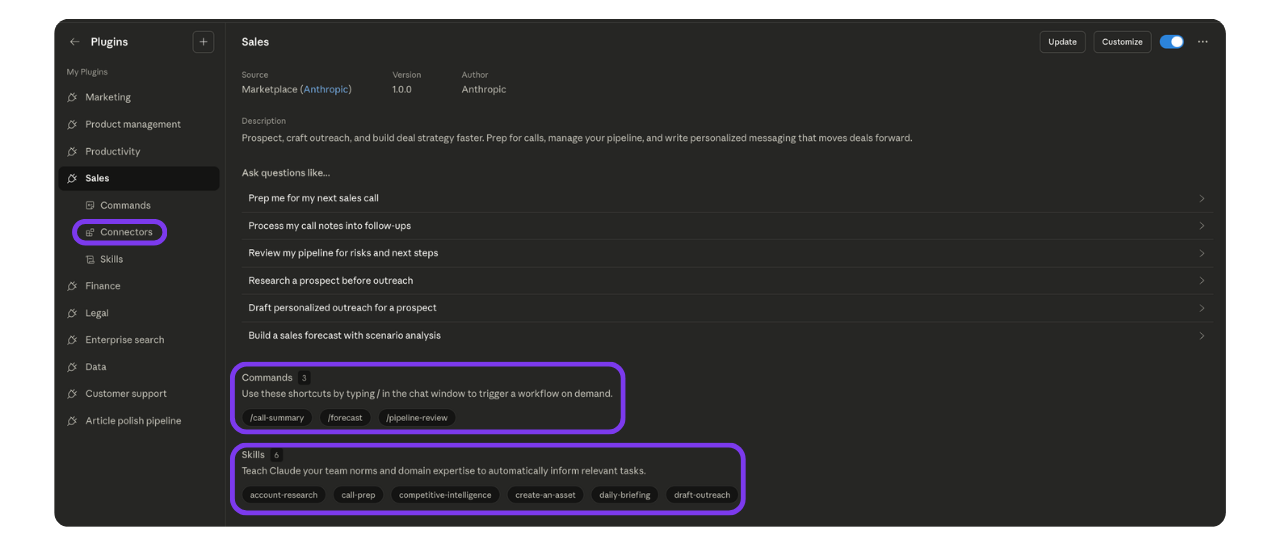
Slash commands (
commands/*.md): quick actions you trigger manually. Each markdown file defines one command, like /plugin:send-updates.Skills (
skills/*/SKILL.md): instructions that teach Claude how to do specific tasks. Claude reads these before executing anything so it knows the best way to do it.(If you’re new to skills, I’ve written about them in detail here and here. They’re worth understanding on their own before you start building plugins.)
Connectors (
.mcp.json): the config that tells the plugin which external tools it can talk to, like Notion, Gmail, or Slack.Sub-agents: parallel workers that handle pieces of a task.
The whole thing is held together by one manifest file (plugin.json) that tells Claude what the plugin is called, what version it is, and where to find everything else.
And the best part is you don’t need any technical knowledge to create them in Cowork. Plugins are just files, and you can build them with Claude using simple words. I’ll show you how in a bit.
How Cowork plugins work in practice
Say you’re a freelancer managing five clients. Every Friday you need to send each one a status update.
Without a plugin: You open Notion, check what’s due this week, then ask Claude to “use my client communication skill” and paste in the project details for each client. One by one. Five times. Then copy each draft into Gmail yourself.
With a Cowork plugin: You have a client management plugin set up with your skills, your Notion connector, and a few slash commands. One of them is /client-updates. So you go to Cowork, type “send /client-updates” and that’s it. The plugin pulls active projects and deadlines from your Notion account, writes a status update for each client using your communication skill, flags anything overdue, and drops the drafts into Gmail ready to send. One command, five clients handled. That’s agentic AI in practice.
But before we get into how you can create your own, let’s start with the ones Anthropic already built. There’s a good chance you’ll find something useful in there.
The official plugins from Anthropic
Anthropic shipped 11 plugins, the same ones their team uses internally.
Sales, marketing, legal, finance, customer support, product management, data, enterprise search, biology research, productivity, and a meta-plugin for building your own. All free, all open source.
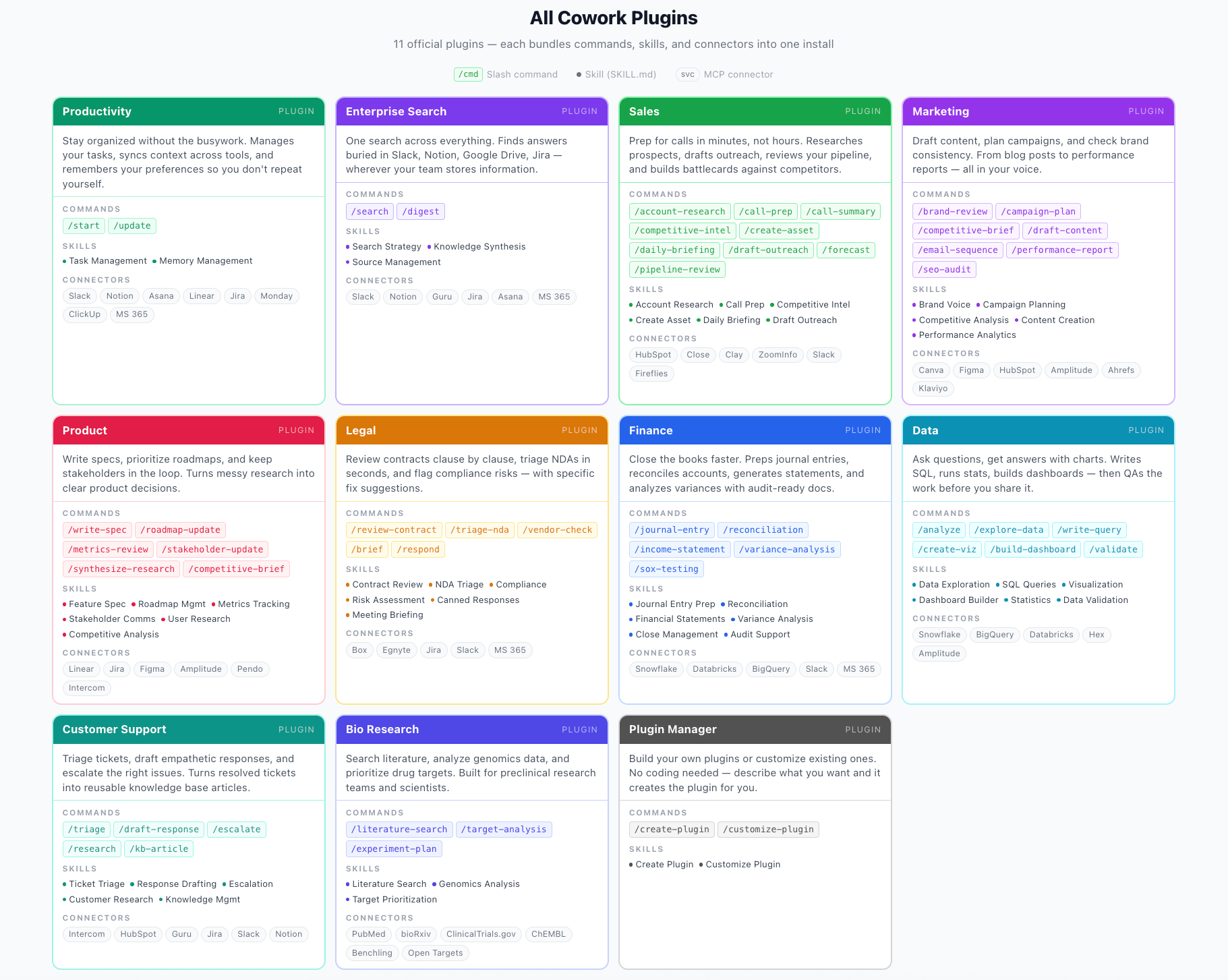
You can install them directly in Cowork, customize them to your workflow, or browse the full collection on their website and GitHub.
How to install, use, and customize plugins
Getting started is the easy part. You can install a plugin in seconds. The real work is customizing it.
Installing
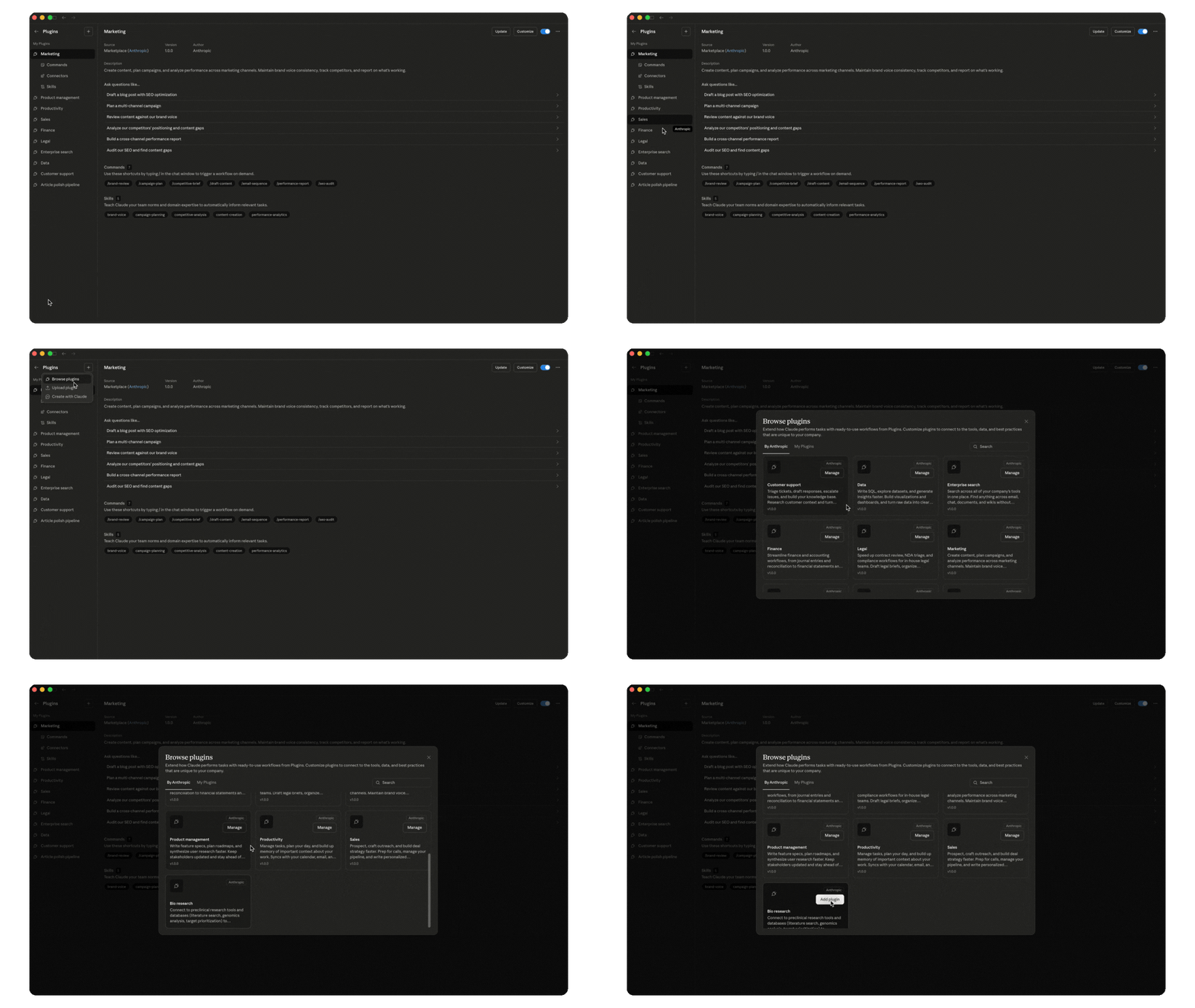
Open Cowork, go to Plugins in the sidebar, click “+”, and browse the available plugins. All the official ones from Anthropic are right there. Pick one or more, click “Add plugin,” and you’re done.
Using them in your workflow
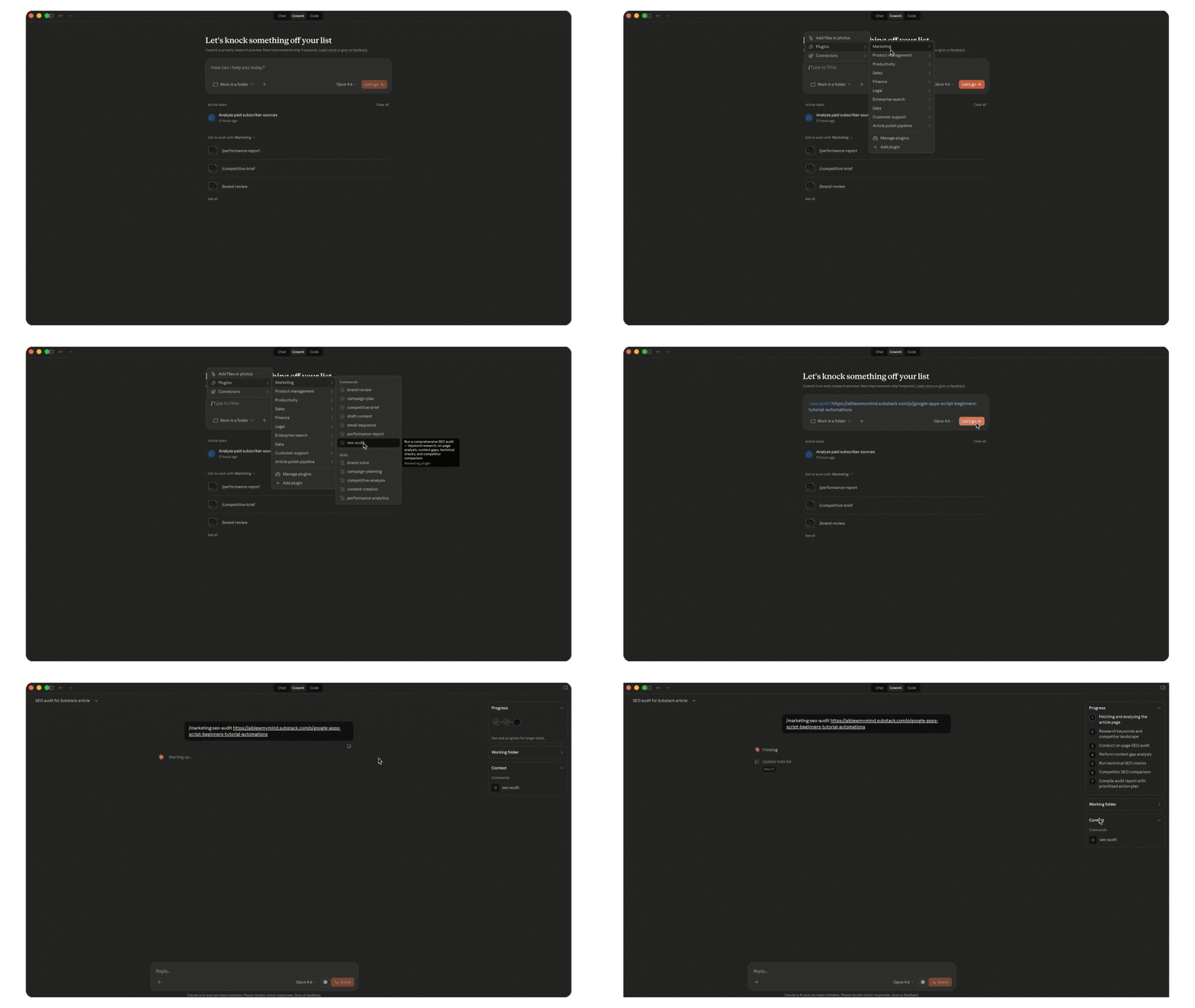
Type the command directly in the chat (like /sales:call-prep) or click + in the Cowork chat, go to Plugins, select the plugin, and pick the command or skill you want to run.
Skills also fire on their own. If you’re working on something and a skill is relevant, Claude will use it automatically. But you can always trigger one manually too.
Customizing for your work
Not everything needs customizing. Some commands and skills work great as they are. The /seo-audit command is one of my most used and I wouldn’t change a thing about it. But others get way more useful when you make them yours.
Click “Customize” on any installed plugin, and Claude walks you through it.
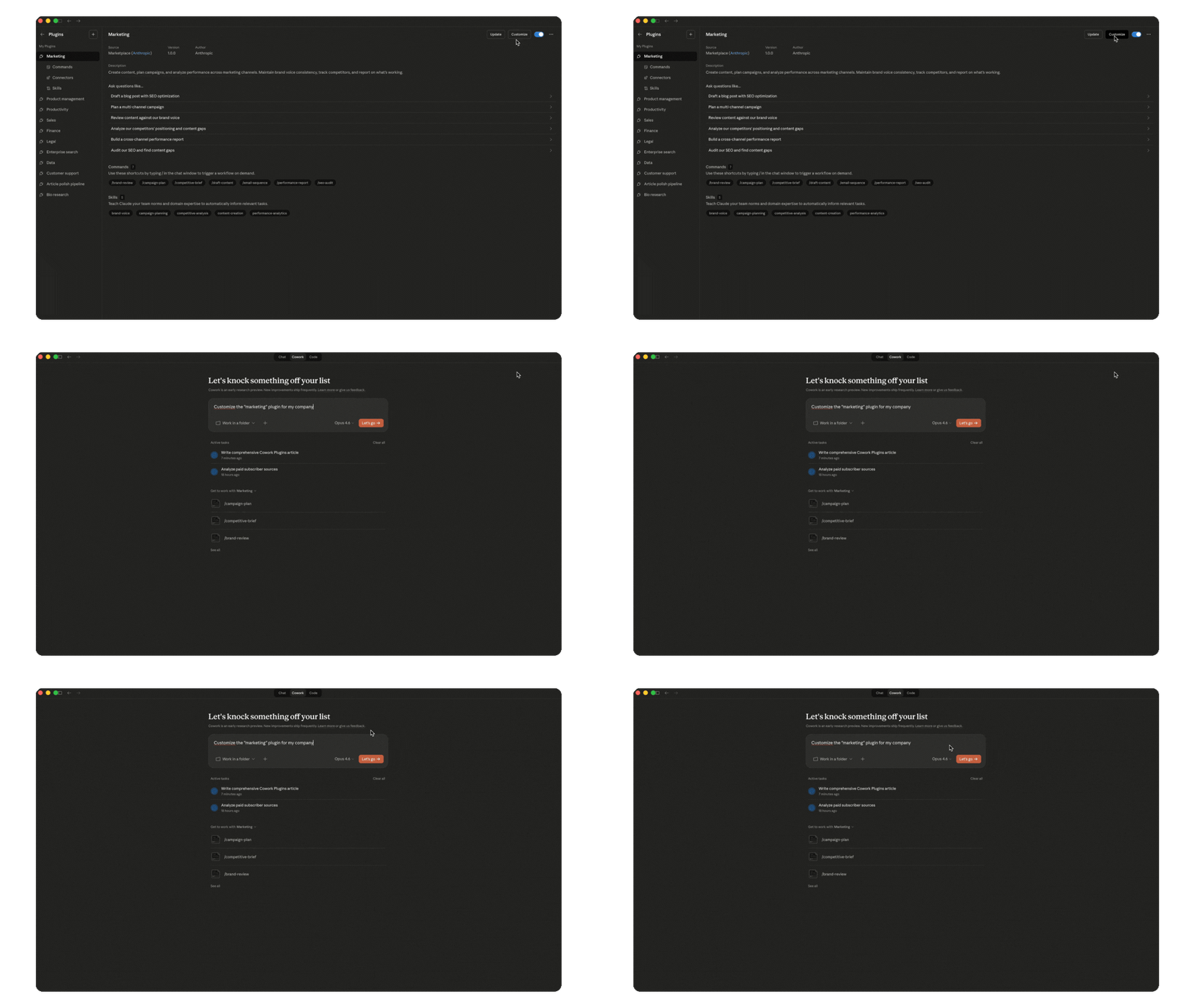
Swap the connectors to match your tool stack. Add your company’s terminology and processes. Adjust the workflows to how your team operates.
Here is Daria Cupareanu original article, which include a plug-in she uses to create here content:
Claude Cowork Plugins: What They Are, How to Build One (+ My Writing Plugin, Fully Broken Down)
Reading Daria’s breakdown reminded me of something I wrote about earlier this year in “How I Reclaimed My Attention by Making One Decision Stick.”
In that piece, I argued that most overwhelm isn’t really about too much work. It’s about unfinished thinking. Tasks survive not because they are necessary, but because a clear decision about them was never made.
That insight matters even more in this new AI landscape.
Tools like Claude Cowork plugins don’t magically eliminate work. What they really do is expose the structure of your thinking. If your process is vague, the tool won’t help much. But if your judgment has already been clarified into decisions, rules, and standards, suddenly entire workflows can run on demand.
In other words, the leverage doesn’t come from the tool.
It comes from the clarity behind it.
Which brings us back to the deeper question many professionals are facing right now:
Not how do I use AI faster…
But what parts of my work are clear enough to become a system?
That’s the frontier worth exploring.
And if you want to revisit the thinking behind this idea of decision design vs. task management, you may enjoy the article where I first explored it:
How I Reclaimed My Attention by Making One Decision Stick.
Sometimes the biggest productivity breakthrough isn’t a new tool.
It’s finally making the decision that was quietly waiting underneath the work all along.
See you next Monday as we continue to navigate AI Opportunities.
JS
Know someone who can benefit from this content?
Thank you for having me here!
Thank you for featuring my work, Juan!