


At 5:30 in the morning in West Virginia, the owner of a lawn care, landscaping and snow removal company gets his rundown for the day. It comes from a bot called Hank.
Hank also keeps the fleet mileage logs, orders and tracks parts, updates the website and the Google Business listing, puts together snow bids and reminds him when licenses are due. I know this because the reply was written in Hank’s own voice, in a public thread asking people how they use AI bots in their work.
My bot pulled and sorted the replies, and I read through what came back. The ones that stopped me were the owners who sounded most like the people I work with, and they were handing off the same handful of jobs.
TL;DR: I’ve worked with dozens of business leaders and operators on bringing AI into their work. When Parker Smith asked on X how people run most of their work on AI bots, we pulled 1,032 replies. The biggest pattern by far is one “front door” bot that hands work to helpers that each do a single job. Owners use that setup for a morning brief, follow-up, and the money and records work, and they hit the same walls: credits and memory. I run my own business on the same shape, and by my own estimate I now get a 40-hour work week done in 2 hours. Below is a starter prompt, what I saw, how my setup works, and what I’d do first.
The starter prompt
Paste this into whichever AI assistant you already use. It makes you pick one job first, which is the part most people skip.
I run a [type of business] with [number] people. I want to set up one assistant that acts as my front door, plus one helper that does a single job.
Step 1. Ask me five questions about my week, one at a time, to find the one recurring job that takes the most of my time and follows roughly the same steps every time.
Step 2. Write a one-page job description for a helper that does only that job: what it reads, what it produces, when it runs, and what it must never do without my approval.
Step 3. Write the front-door instructions: take my requests, send this job to the helper, check the helper’s work against the job description, and only bring me what needs my decision.
Step 4. Tell me how to time this job for one week before and one week after, including the minutes I spend checking the output.
Ask me before you assume anything about my business.
[Subscribe button → buildtothrive.co/subscribe] Paid subscribers get the Vault: the prompts, tools and tactics I actually use, plus a new one every week.
What I looked at
Parker asked people who automate most of their work with their bots to reply with how they use them, and offered credits in return. The thread had about 2,400 replies when we pulled the sample. We collected 1,032 of them, spread across the life of the thread. Set aside Parker’s own replies and two automated accounts, and that’s 1,015 replies from about 930 people.
Keep two things in mind. This is a sample, a bit under half the thread, and the people answering were enthusiasts, some there for the credits. Many replies were thank-yous and one-liners. And the counts come from sorting replies by keyword, so read them as rough sizes, not exact tallies.
The biggest single job was coding, which isn’t where I’d send a landscaper. What caught my attention was bigger than any single job. About 1 in 4 accounts in the sample, by far the largest group, didn’t describe one clever assistant. They described a small team: one bot that takes the request and hands it out, and helpers that each own one job.
The 5 patterns
1. One front door, many single jobs
A small excavating and utility contractor described about 15 bots. His chief of staff takes his requests, hands the work out, checks what comes back, preps bid packages and quote requests, and tracks open items. A separate billing bot logs new work orders from client emails.
An ecommerce CFO described about 15 bots under a chief of staff that routes tasks. A one-person marketing department for an HVAC, plumbing and electrical company described about 18, each with one job.
Nobody here asks one assistant to be good at everything. The owner talks to one place, each helper does a narrow job the same way every time, and in the better setups the front door checks the work before the owner sees it.
2. A brief before the day starts
Hank’s 5:30 rundown is one version. A French tiling contractor gets a 7am brief of his mail, his calendar, his jobsites and any clients who need him urgently. On an Illinois grain farm, a weather bot makes the morning go or stop call.
In the sample, at least 44 people named a calendar and at least 26 described routines that run on a clock. This is the one I’d point most operators to first. A brief doesn’t decide anything for you. It saves you the hunt through the inbox, the calendar and the job list.
3. Follow-up: leads, quotes and suppliers
At least 50 people described sales and lead work. The HVAC marketing desk has one bot just for website leads and another for Google review replies. A solo founder with no employees has bots find prospects, verify emails, load them into his CRM and draft sequences for his approval.
The same chasing shows up away from sales. The tiling contractor’s bot chases suppliers and clients, and asks him for the grout color when a jobsite is missing one. That detail is my favorite in the whole thread. The bot does the chasing. The owner makes the call only he can make.
Email showed up for at least 52 people, and for an operator a lot of that is follow-up nobody misses doing.
4. The money and the records
At least 40 people described bookkeeping and finance. One owner has a bot that checks email for invoices, enters them into QuickBooks and emails suppliers to confirm payments. A landscaper with more than 100 clients runs QuickBooks billing, payments, client emails and estimates through his, and says it saves him hours. Someone doing accounting work for clients has one pull client data from Google Drive, Stripe and the accounting software and clean it up. The ecommerce CFO has one for expense analysis.
At least 25 described operations and compliance records. A custom-home builder has his bot track his subs’ and vendors’ insurance certificates, email the insurer when a policy expires and follow up when nobody answers. He also has it put together permitting packages. And the invoice owner’s bot runs a custom punch clock that sends each employee a weekly recap.
None of these replies said how they measured the time.
5. Where it breaks
The landscaper named the problem clearly. Even with everything saved in the chat history, he said, it loses track. His reply was cut off right there, so I won’t guess at the rest. Fewer than 20 people raised memory. The bigger complaint was cost: about 60 raised credits or usage limits, often in the same breath as describing a setup that works.
Both point the same way. A team of bots needs a shared record of open jobs and client facts that doesn’t live in one chat. And every extra bot costs something to run.
What stays with the owner
The tiling contractor still picks the grout color. The solo founder approves the sequences. On the grain farm, the setup has a manager step that approves before anything sticks. The machine does the gathering, the chasing and the first draft. The owner keeps the judgment, the relationships and the yes.
How I run my own business this way
I come at this as an operator, not a tech consultant, and I run Build to Thrive on the same shape.
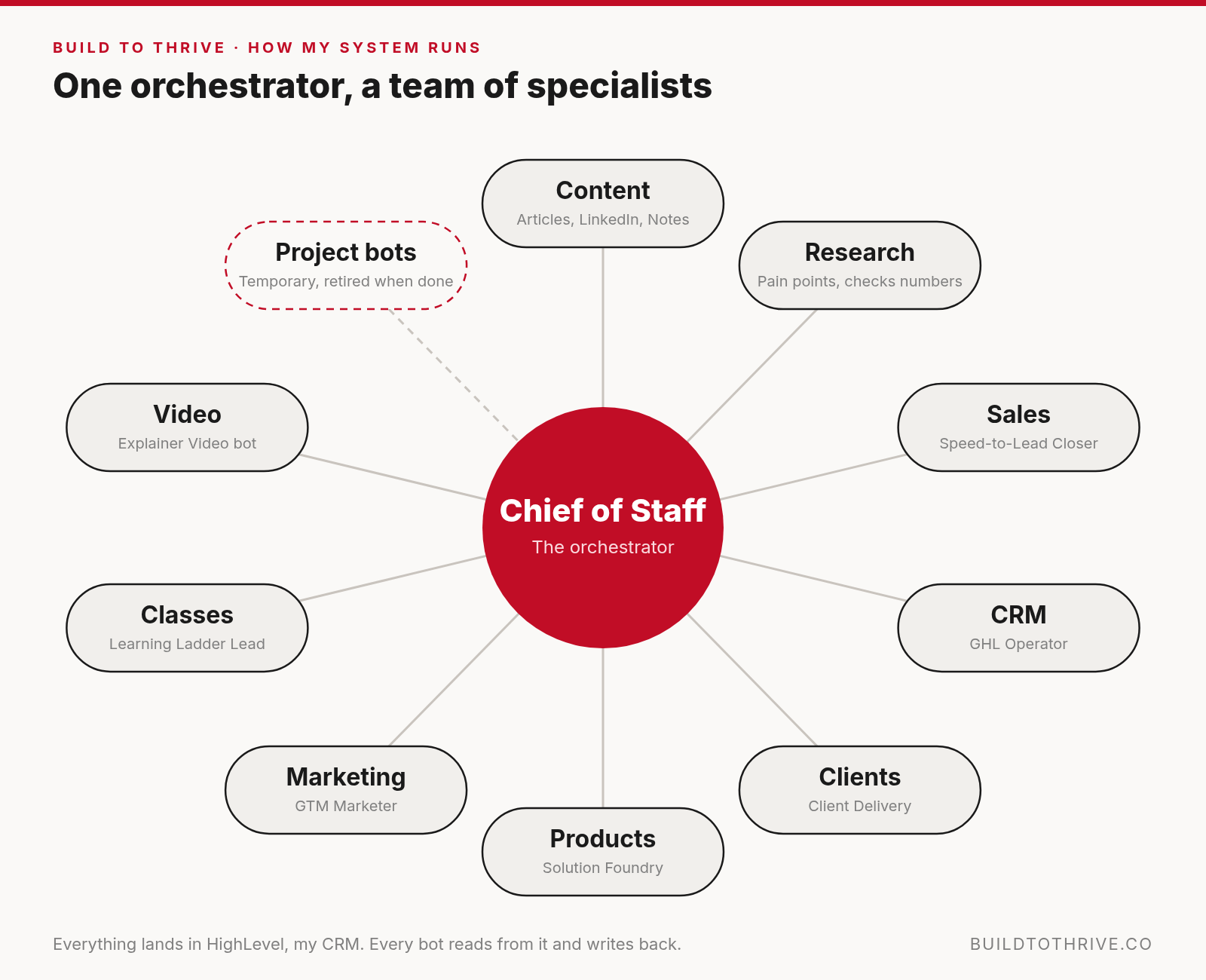
How my system runs: one orchestrator, a team of specialists.
HighLevel is my CRM and the hub everything lands in: leads, forms, quiz answers, class registrations, email sequences. My bots read from it and write back to it. Each has one job:
Chief of Staff: the orchestrator of the whole system, my version of the front door from pattern 1. Morning brief, priorities, decisions, the end-of-day picture, and handing work to the others.
Speed-to-Lead Closer: new leads, follow-ups and booked calls, and it keeps the pipeline current.
GHL Operator: builds and fixes everything inside HighLevel, from tags and contacts to workflows and email steps.
Content Bot: finds what’s getting attention and drafts articles, LinkedIn posts and Notes. I approve them.
Research Bot: digs into small-business pain points and checks numbers before anything publishes.
Learning Ladder Lead: runs my AI in 20 Minutes classes from topic to follow-up.
Client Delivery: client engagements from kickoff to follow-up.
Solution Foundry: turns a pain point into a product.
GTM Marketer: offers, funnels and design.
Explainer Video bot: short explainer videos with checked numbers.
For bigger projects, my Chief of Staff spins up temporary bots for that job, and when it’s done it asks me whether to retire them.
Content and the CRM feed each other. A post sends you to a quiz or the Reflection, HighLevel captures you and starts a sequence, and what you reply tells Content Bot what to write next. (I am teaching how I setup my content bot tomorrow at noon. Check it out here.
With this setup I do the work a 5 to 10 person organization would do, and sometimes more, depending on how complex the job is. What beats everything else is how fast it coordinates and executes the moving parts, how much it remembers and proposes solutions based on my objectives, and the knowledge across multiple skills and anything that is out there on the web that its pattern recognition distills and process.
In terms of the one-person company, I estimate that a 40-hour week takes me about 2 hours of my time with AI, or take this to a month, in about 1.5 days I would cover 22 days.
To further illustrate my point, I put together a short video based on a real client I helped through my AI in 20 Minutes class: a trades owner who found five hours back a week. The name and the scenes in it are illustrative.


If you’d like to find your own first job with me shoot me an email to juan@buildtothrive.co or start here Better Business Reflection it will go through every question that you can ask yourself about running your business and where AI fits. It is designed to make you reflect so take your time. BTW…it comes with 96 prompts once you are done.
How to start: the five steps
Here’s the order I’d follow, the same five steps we use with teams, scaled down to one helper.
Diagnose. List the jobs that repeat every week and follow the same steps. The brief, the follow-up and the invoices are where the owners in this thread put their bots to work.
Define. Pick one job and one outcome. For most owners that’s time. Write down how long the job takes today.
Design. Write the helper’s job description: what it reads, what it produces, when it runs, and what it never does without your approval. The starter prompt does this with you.
Deliver. Set it up yourself and run it on real work for a week. Check everything it produces.
Drive. Time it again, and count the minutes you spend checking. If the job takes 20 minutes less but you spend 30 checking it, that’s worth knowing. Only add a second helper once the first one holds up.
Pick one job this week
Some people in this thread run 30 bots. The owners who sounded most in control described something plainer: a brief at 5:30, a certificate that needed chasing, an invoice that needed entering. Pick the one job you’d hand off first and time it this week.

More from Build to Thrive
How a Prompt Becomes a Machine: how one recurring job turns into a working system, one proven step at a time.
Is AI Actually Giving You Time Back?: a simple way to time one task, including the checking minutes most owners leave out.
Your Business Should Prepare the Work Before You Arrive: why technology should make your decisions easier to make, not make more of them for you.
Sage: The Voice Agent That Helps You Find What Is Causing Your Operational Drag: a real conversation that won’t let “kind of a mess” stand.
The 7 Prompts That Turn Your Experience Into an Offer People Could Buy (for paid members): the method I use with professionals turning their experience into something people could buy.
Thank you for reading,
Juan
a bot named hank sending the 5:30 rundown is the most believable agent story i've read this month. boring jobs stick
Hi Juan! The tiling contractor whose bot handles the supplier follow-ups but still comes back to him on the grout colour is the clearest illustration of where the line sits, and it is a more useful test than any list of tools. Your point about needing a shared record of open jobs that does not live inside a single chat is the bit I suspect most people will find out the hard way.