


Hello, I am Juan. I have started four companies, and two 7-figure exits. I am building my fifth: a media company for operators and professionals chasing leverage, income, and opportunity in the AI economy. I help businesses grow, and I share what I learn as I go, openly, with you. More of my work, free resources and how I can help is at juansalasromer.com. I hope this article earns your time.
One morning, concerned about my token costs, I discovered that my briefing agent had read about twenty files, opened four full transcripts of the day before, and paged through every contact in my address book, all to hand me a half-page summary of my day. Picture a human assistant doing that: photocopying the entire filing cabinet every morning to write you one sticky note. You would catch it in a week. Because it was an agent, the work looked instant and the cost stayed invisible. That is the whole trap.
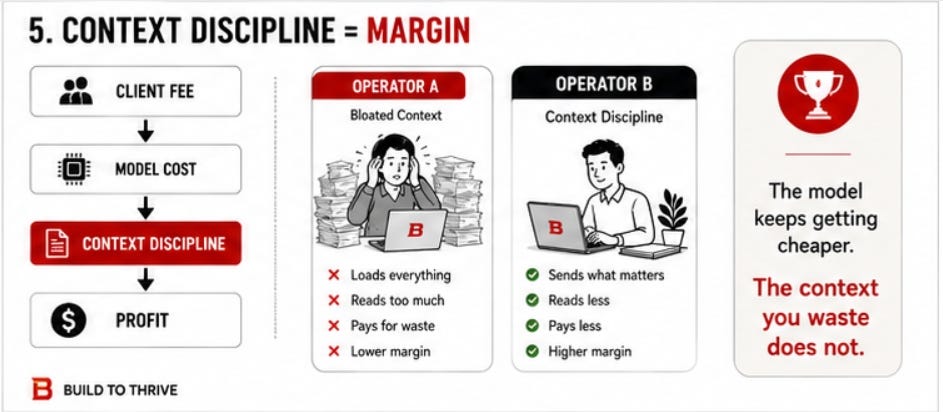
In May 2026 a line from AI engineer Andrej Karpathy spread among builders: roughly 90 percent of a typical AI coding bill pays for context the user did not need to send. The shape is easy to picture. An AI tool loads 50 files into memory to answer a question about 30 lines of code, and you pay for all 50, used or not. Run that fifty times a day and the unused reading, not the answers, is most of the bill.
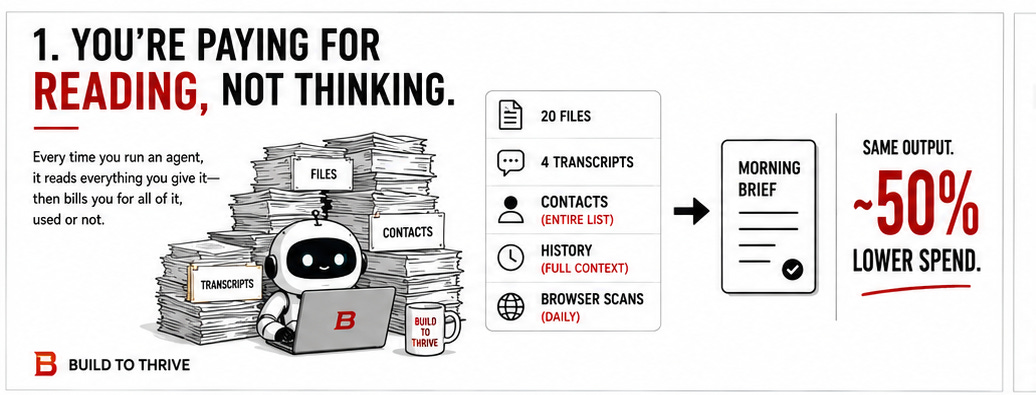
Here is the way I think about it now. Your AI is not charging you to think. It is charging you to read. Every agent I run is a fast, eager assistant who reads everything you put in front of it before it answers, and bills you for the reading whether it used a word of it or not. You are probably not writing code. I am not either. I run Build to Thrive on a fleet of about fourteen of these assistants that draft my newsletter, scan my inboxes, prep my client work, and write my morning briefing. Different work, identical bill. The mistake is the same on both sides: you go looking for a cheaper assistant when the real leak is the stack of paper you keep handing the one you already have.
This is the same lever I wrote about in this week’s Blueprint, You Do Not Need a Better AI. You Need a Better Brief. The AI Blueprint | Week of June 15th, from the other side. A vague brief is expensive twice. You pay for the rough draft you have to fix, and you pay for the pile of context you dumped in hoping the model would sort it out. Cut the pile and the bill follows, with the output unchanged.
WHAT YOU WILL NEED
Before you start, you need very little:
- One AI tool or agent you run on real work, the more often the better.
- The one workflow you run most. Frequency is where waste compounds, so that is where you look first.
- A way to see what your tool loads before it answers. If you cannot see a token meter, and most of us cannot, you will audit by counting instead, which the next section covers.
- About two hours, and a willingness to read your own logs.
THE ONE PROMPT THAT FINDS THE LEAK
You do not need a token meter to find waste. Take the one workflow you run most, then paste this into your AI before you change anything:
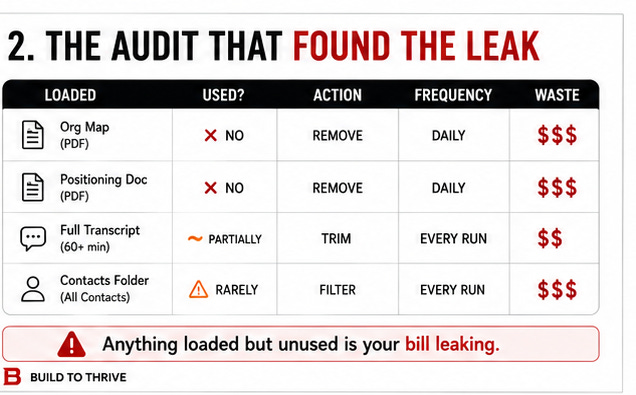
“List everything you load or read before answering me on this task. For each item, tell me whether your last answer actually used it. Flag two things: what you loaded but did not use, and what you reread every time even though it rarely changes. Then propose the smallest set of inputs that would produce the same result.”
Whatever it flags as loaded-but-unused is your bill, leaking. The reread-every-time pile is the standing waste you fix once. The five steps below are what you do with that list.
THE STEPS
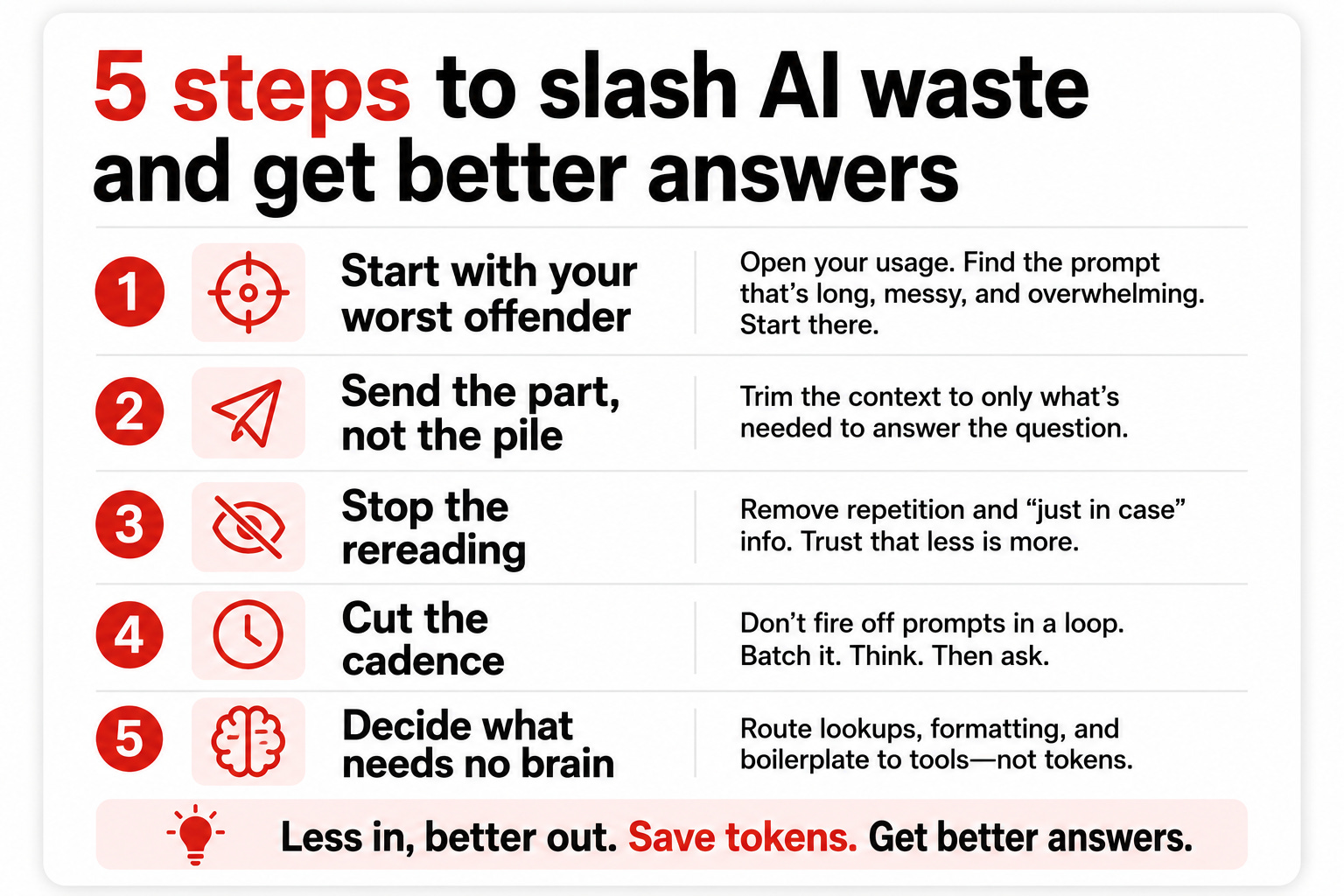
Step 1: Start with your worst offender
Why it matters. Waste compounds with frequency, so the cheapest win is hiding in the thing you run most, not the thing that feels most expensive.
What to do. Point the prompt above at your highest-frequency workflow first. Read what it loads against what it actually used.
Example. I started with the agent that writes my morning briefing, because I run it five days a week. It was reading about twenty files a run, pulling up to four full transcripts of the prior day’s work sessions, and opening my entire contacts folder whether or not anyone in it came up. Most of it never reached the brief.
Pitfall. Audit the thing that runs, not the copy you assume is real. My first move was to optimize a file that turned out to be a stale duplicate of the instructions, not the version actually running. I almost spent an hour tuning a file that does nothing.
Step 2: Send the part, not the pile
Why it matters. Most “I need the whole file” instincts are wrong. The model needs the section that matters, not the whole document, and you pay for the difference every run. Hand your assistant the one folder the answer is in, not the whole cabinet.
What to do. For anything stable that rarely changes, stop sending it every time. Send the relevant part, or send it only when it has actually changed.
Example. Three of my twenty files were locked documents that almost never change: my positioning, my business brief, my org map. The agent re-read all three daily. Now it reads them only when they change, and the session pull dropped from thirty messages to fifteen because the brief only ever uses the tail of a conversation.
Pitfall. The “just in case” include. You add the file because you are not sure the model needs it. Default to leaving it out and letting the model ask.
Step 3: Stop the rereading
Why it matters. A long session re-reads its entire history on every new turn, and a standing context file re-reads the parts that never move. Both are pure waste.
What to do. Close long sessions with a short handoff and open a fresh one. Keep your standing context in one file, and make the tool stop re-reading the stable parts of it.
Example. I closed a bloated work session with a five-line handoff and started clean. That is the same move, run on the work itself.
Pitfall. Reaching for prompt caching as the fix. Everyone recommends it, and it barely helped me. Caching is a thermos: it keeps your context warm for the next pour, a gift if you are pouring cups all afternoon and useless if your next cup is tomorrow morning. My agents run once a day, so the thermos is always cold by the time they wake up. Caching pays off when you fire many times in a short window. For a daily schedule, the lever is not caching what you load, it is loading less.
Step 4: Cut the cadence where frequency was the cost
Why it matters. Some agents are not expensive per run, they are expensive because they run too often for what they return.
What to do. Find the heavy jobs running more often than the work requires, and space them out. Make sure they pick up where they left off so nothing is missed.
Example. Two of my agents ran a browser scan every day. I moved the two heavy ones to every other day. They stop at the first item they have already seen, so they just clear a slightly bigger batch. That one change removed about eight heavy runs a week.
Pitfall. Spacing out a job that does need daily cadence. Cut frequency only where a longer gap changes nothing about the result.
Step 5: Decide what does not need a brain
Why it matters. The biggest lever coders talk about is routing mechanical work to a cheaper model. On a no-code fleet you often cannot assign a model per task, but you can ask a sharper question: does this job need a thinking model at all? You do not book a surgeon to put on a band-aid, and you do not need a reasoning model to move a file.
What to do. For purely mechanical jobs, copying a file, moving a record, stop running an AI for them and move them to a plain script.
Example. I pulled several mechanical steps out of my agents entirely. You cannot always route a task to a cheaper brain. You can often decide it does not need a brain.
Pitfall. Scripting something that actually needs judgment. Keep the model on anything where the right answer changes with context.
THE FINISHED RESULT
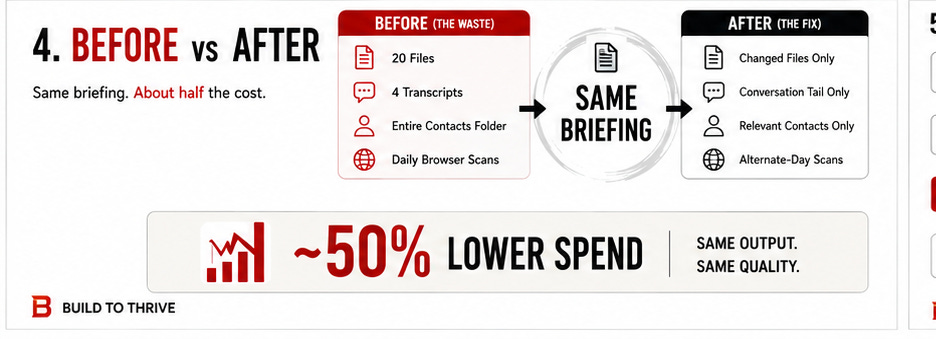
Here is the before and after on my worst offender, with no change to what it produces.
Before. The briefing agent read about twenty files every run, pulled up to four full session transcripts, and opened my entire contacts folder, five mornings a week. Two other agents ran heavy daily scans. Earlier in the year, before any of this, three more agents were doing work already done elsewhere.
After. The agent reads only what changed, pulls the tail of a session instead of the whole thing, and opens a contact file only when that person comes up. The heavy scans run every other day. Switching off the redundant agents in the spring had already cut my daily spend by roughly half. The briefing reads exactly the same. The bill does not. It stopped photocopying the cabinet, and nobody on the receiving end can tell.
The input-side version of this same discipline is the brief. This week’s Blueprint ships a free one-page Delegation Brief Build to Thrive | The AI Blueprint | Week of June 15th, 2026, the four-part template for specifying work so the model reads less and guesses less on the way in. The audit prompt finds what your agents over-read; the Delegation Brief stops you over-feeding them in the first place. They are two ends of one habit.
If you would rather see where else your operating model leaks time and money before you touch a single workflow, the free AI Leverage Assessment (https://learn.buildtothrive.co/mytimeback) runs that read in about twelve minutes. If you would like to turn this into a priced, margin-disciplined service build it out inside Founder 100 (https://learn.buildtothrive.co/founder-100). I am running a special promo for $99 dollas for a 2-hour session.
It is dull work. It is also the line between a service that scales and one that just keeps you busy.
Juan

50 Creators Shared Their Rock-Star Prompts. Here They Are
Six months ago, I started reaching out to creators I was curious about, plus a few I was lucky enough to get referred to. Mostly one virtual coffee at a time.
The ask was simple: would you be open to sharing your rock-star prompt with the @Substack community in my Monday AI Blueprint edition, and have your newsletter featured alongside it?
Nothing here was scraped or borrowed. Every prompt was shared deliberately and generously, by people who had no reason to hand over their sharpest work — except that they believe knowledge is worth more when it moves.
And move it did. The depth, the ingenuity, the sheer practicality of these creators left me humbled. This edition is a small monument to their generosity.
So today, with a lot of gratitude, I’m sharing a consolidated volume of 50 prompts from 50 creators. Thank you to every one of you who said yes. I hope you all enjoy it.

Join 4500+ subscribers
The long-chat point got me. You think you’re carrying useful context forward. Meanwhile the AI’s rereading the whole family history every time you ask one more question.
That's why I keep very specific tasks in different chats, so the prompt and context is brief.
That single prompt alone is gold, and can make the difference between getting real work done, and getting stopped right when you're making progress, Juan!